School Year end 2025

We’ve been on summer break for just over a week now and I’m feeling sufficiently rested to sit down and write again.

Book returns

The end of the school year is always a busy time for librarians with the dual task of getting overdue books back and making sure that students have enough of the right books in their hands to entice them to do some reading over the summer. It really is a dichotomy – the students who most need to read more are the ones who have the hardest time keeping track of books – probably because they just borrow because they’re being told to do so and then promptly put the books somewhere never to be found again. And then of course when they become overdue it’s a fuss and bother and they are even less inclined to borrow.

Inventory

The big tasks include doing inventory – something we’ve turned more into a continual process so by the end of the year it’s more just following up on missing items – often they return – from students (or more often returned by nannies or parents) who consider going past the circulation desk as being optional. Unfortunately being in the middle east certain types of books also just disappear depending on the heat of current rhetoric – or in the case of this year actual bombing going on.

Core Collection

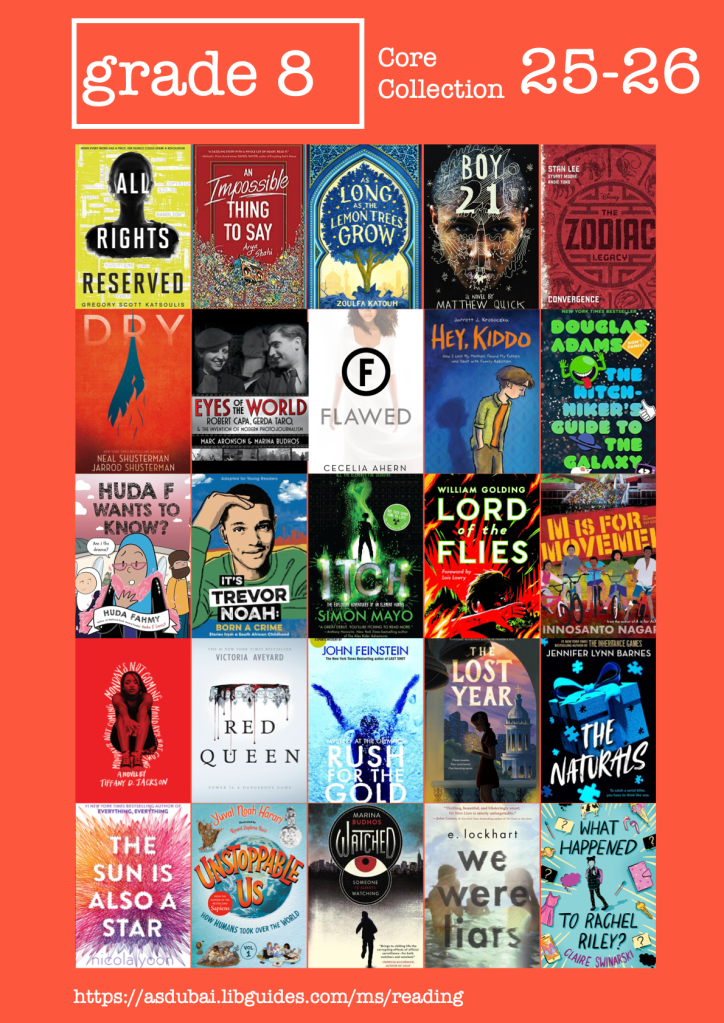
With our ELA (English Language Arts) department I’ve been very busy creating our new “Core Library Books” for the coming year (Grade 6; Grade 7; Grade 8)
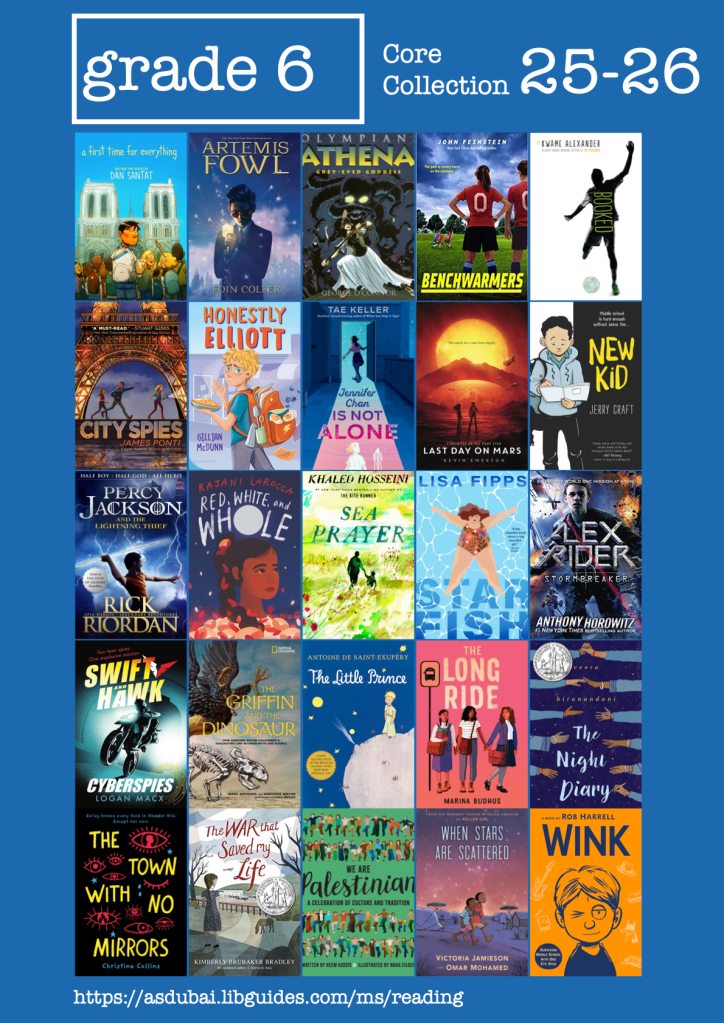
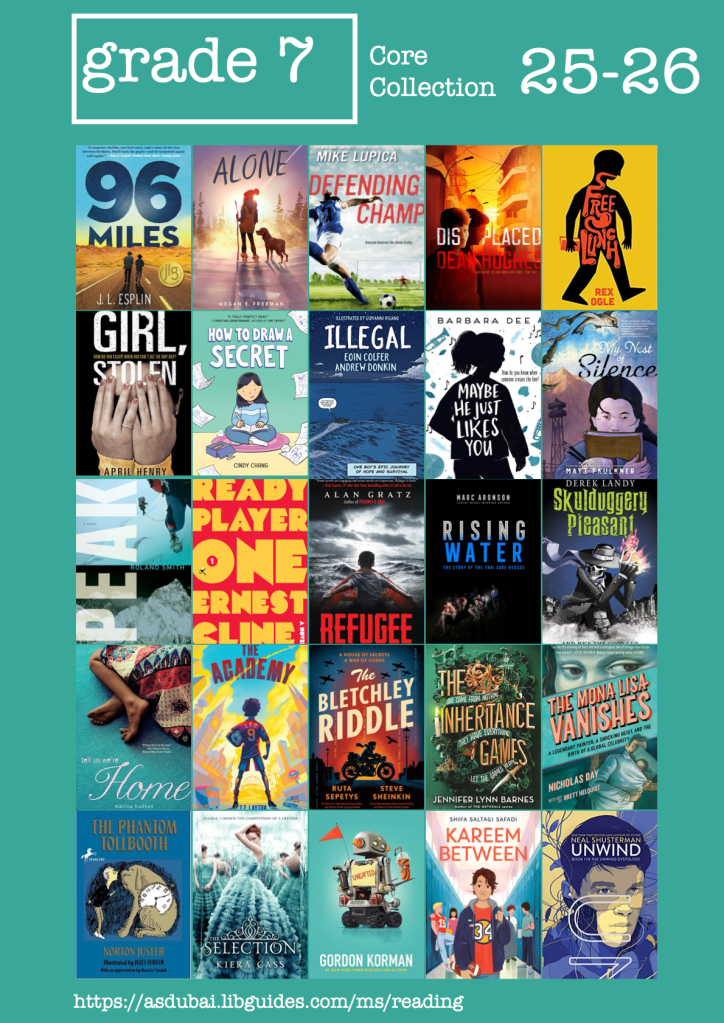
And, continuing the tradition started last year, promoting them first with our middle school faculty. I’ll do a separate blog on the result of the core collection this year.

Summer reading

This also feeds into our Summer Reading Libguide which we try to promote as much as possible with students and parents. A few of the ELA classes had their students explore the guide and the various reading lists in detail and then make their own reading goals based on the lists and then email their parents with their reading plans and either borrow the books or request parents purchased them for the summer. I was also on hand with Sora Marketplace open to purchase the eBook or Audiobook for the students who wanted a digital copy. Our summer reading borrowing guideline is “as many books as you need and know you can take care of and return after the break

Annual Report

The most arduous task at the end of the year, and one which it seems many international school librarians have more or less given up on, is creating the annual report. I can see why people stop doing this. With declining borrowing / reading it can be quite a depressing exercise. It’s also remarkably difficult to get good data our of our systems. Follett Destiny is a dreadful platform to get good data from – in contrast with other systems. I was reading Rutger Bregman’s “Moral Ambition” (see video below) around the same time, and came across the concept of vanity metrics – basically just putting together data that makes you look good. With that at the back of my mind, putting the report together (Annual Report 2024-25) became this exercise in trying to show both that the situation with reading is not great while trying to show that as librarians and teachers we’re doing our darnest to turn the tide and hopefully all is not lost. And even when we lose in reading perhaps we’re making inroads in research. Much as I hated studying business / accounting and was glad to escape being financial person it did put me in good stead for being able to work with data.

I’m planning on doing a bit more blogging this break, so keep coming back! Comment on any topics you’d like to see covered.

Learning but not yet

So I got fired up about learning Javascript and then I had to do some very practical stuff in HTML/CSS that took way longer than I thought it would with considerable troubleshooting. So that’s been parked.

Even as a teacher, when I do stuff I’m learning about learning. Like the fact that when I originally wrote that blog post about customisation of libguides at my previous school, I’d spent a lot of time in that summer getting acquainted with the ins and outs of bootstrap/HTML/CSS. And because I was using it a lot it seemed quite easy. And then with a hiatus of nearly 5 years, I’d forgotten so much I had to almost re-learn it all again. It’s a little bit like my journey with learning Chinese, and forgetting Chinese and relearning Chinese, and taking a break and having to start learning it all over again. The dilettante model of learning and doing is not necessarily super efficient – Adam Smith definitely had a point on comparative advantage.

And one of the big lessons? I spent quite a bit of time doing some fancy bootstrapping for the landing page and then looked back at the guides I’d made at my previous school and realised that there is no point if there is no one to maintain and sustain it (maintenance is a big thing in my thinking – see this post from last year which was one of the most read posts I’ve written). So I reverted to something more standardised – I also believe that constraints are an important thing in creativity.

So, I’ve relearnt some HTML/CSS and managed to make a good-enough header/nav bar and footer that functions, and I’ve re-discovered the nice geeky hideout that is the Springshare lounge with their very supportive community. And I know a lot more about what I don’t know … which is a lot.

And maybe when I need a career change I’ll do some more programming and stuff … I once thought I should become an editor because I have the uncanny ability to glance at pages of text and see the one spelling, punctuation or grammar error, and working through all of this I’m developing an eye for glancing through code … very infant stuff still, but maybe something worth developing.

============

Photo by Joshua Sortino on Unsplash

First the earthquake and then the tsunami

Six weeks done and we enter our virtual online Spring Break. And my social media both professional and personal is awash with questions from people about school closure and online learning from a teacher/librarian/tech/personal point of view. It’s the long tail, the tsunami hitting land after the earthquake at sea. And I know that’s just a pretty picture of a wave on my blog and nothing at all like a tsunami. We in China had the Earthquake and now as folk in the rest of the world start running from the Tsunami we’re inundated with questions.

I’m not sure we’re equipped to answer them.

As private international schools in Asia we are a bunch of extremely privileged people. Both educators and pupils. My “go to” people in the China EdTech /Education world are a relatively homogenous group in that we are all well resourced and can go back to our leadership and ask for the money we need for the things we need to support and sustain online learning.  We have strong and capable leadership in our school who have modeled best practice in their empathetic and compassionate attitude and behaviour to all constituents of our community. We haven’t had to deal with salary cuts, union rules, students in situations of extreme poverty, or unreasonable demands. My colleagues and peers are a sharing, giving bunch and the things we create or come up with are shared freely without cost to others as we build on what works. The companies we work with have been super helpful and responsive and generous.

But the Tsunami has hit shore, and the coastal dwellers include the most vulnerable and least equipped or prepared for this. Our solutions won’t and cannot be their solutions. We have to remain humble in our responses. Even as I realise this and write of my experience I realise this comes from a place of privilege. I have these resources I can rely on.

The personal and political

This blog is a little more personal as I sit in the early hours of the morning after a fitful sleep. The virus has come close to home. A child in my daughter’s boarding school in the UK was diagnosed with the virus yesterday. After he left the school to go back to Europe on Wednesday. We heard last night European time. My husband is still in Nanjing. My son is with me in Switzerland. She’s in the UK. Three jurisdictions. Three different social, ideological cultural and emotional responses to this event.  But what does that matter when you have to make decisions? Decisions that could put other people at risk – like her guardians in the UK. A country that won’t let her be tested privately or publicly before going to them. A place where a lot of air-traffic is still occurring due to bizarre travel decisions by the leader of yet another nation. Where schools won’t/can’t make autonomous decisions and need to look to their government, but where the government, unlike the Chinese government, has a more cavalier response to the situation. And it seems is putting economic and political expediency above people’s lives. I keep second guessing myself.

This much I know is true. She should not be in a boarding house/school with so many other people. She can self-isolate with our friends / her guardians. She should not be travelling internationally at this time – airports / planes = high risk. Virus statistics and reporting is a numbers game. Literally a game. You test, your infection stats go up your fatality rate goes down. You don’t test, you can pretend all is ok. But then people die.

These are my concerns. Is she infected? If so, she infects the people who are generous enough to take her in. They infect other people. She gets ill – she’s young and healthy – but what if she gets very ill? I’m relying on friends to take care of my child, my young adult?

Parenting online

Ok, so a bit more about parenting (or the lack thereof) during the virus.

I wrote this for parents on a libguide right at the start of school closure. It was recently included in an article by ISTE so I thought I’d better revisit it. Funnily enough I don’t think I’d change anything. I’ll just expand a little on what it looks like practically and in reality for people going into this.

I’ve been working crazy hours, so parenting has suffered. This is a good thing in some respects.  Above all I think it’s important to keep good relationships going in the home. A big part of that is me refraining from nagging my son. When I do try and take what he considers to be an unreasonable interest in what he’s doing / how / when / how much, it nearly always ends in a row. Unless he’s doing the asking for help – in which case I need to drop everything and attend to him. I just love this (old) NY Times article about being a potplant parent – that’s needed more than ever during online learning.

My son has ADHD. He was totally overwhelmed at first. So were his teachers, even though I don’t think any of them are similarly afflicted. The first inclination for everyone is to try and carry on as normal, just online. It took at least two weeks or more for everyone to “calm the f down” and settle into workable solutions and routines. A couple of strategies that helped for us at home:

  • Putting a desk in the guest room upstairs to stop him working in bed / on the sofa / at the dining table. I know if he’s on his laptop in any of the latter spaces he’s either doing “light” work or goofing off. So does he. When he’s got a serious assignment or a meeting with a teacher he’ll go upstairs to his desk to work. There’s a glass door to the space and my new standing desk (much needed based on the hours I’m spending online and the back and arm ache) on the landing is a few metres away so I’m there but not there.
  • At the end of the first week when he finally admitted that he was losing it and couldn’t cope, I bought a paper agenda and we agreed he’d just think about and focus on two subjects a day. Once he’d caught up he could go back to the regular schedule, we agreed on which subjects they’d be for a few days together and then he took charge again. The fact that our school has moved to an asynchronous learning model is very helpful here.
  • Letting teachers be the teachers. We’re extremely, extremely fortunate to be at WAB. I can’t emphasise this enough. I know that his teachers are supporting him and looking out for him. That means I don’t (and shouldn’t) micromanage his learning. He has regular face-to-face check-ins with his teachers and his class mentor. They have physical and emotional distance from him while still being on his side. I don’t have that. It helps. When he messes up or misses a deadline, or doesn’t respond I will hear about it, but not before. We needed to intervene once with a busy-work / communication style situation, but that’s hopefully been resolved.
  • Sharing the household burden. It’s taken nearly 17 years, but after a week of closure he spontaneously came to me and laid out what part of the household chores he’d take upon himself “without any prompting”. This includes cleaning the bathrooms and toilets, taking out the garbage, helping walk our elderly neighbour’s dog and helping with the cooking and cleaning the kitchen. He’s stuck to that for over a month now and I’m more proud of that (and walking into his room yesterday and seeing it tidy, with the bed made) than anything else during this period.
  • Giving each other space – we’ll each go off for walks on our own. Take time out to cool down if we have words or after a shout. Yes I shout. And swear. And so does he. We’re human and emotions can run high. But we’ve found a new type of equilibrium in our relationship, an understanding that that should be more important than all the other details. It’s been a long time coming.
  • And I think he’ll want me to add this, he’s not a gamer. That’s huge. I know families with big concerns about the vast amount of time online at the moment that’s spent gaming not learning. I am grateful to him that this is not the case, and he reminds me of it when he sees the impact on some of his friends and peers.

This gif shows how I felt by 7am yesterday morning after nearly 7 weeks non-stop working. We’re now in our Spring Break and I’m promising myself to get off the computer and do some reading. Of real physical books!

via GIPHY


____________________________________________________________________________________________

Photo by Joshua Dewey on Unsplash

Ha, ha, ha bonk

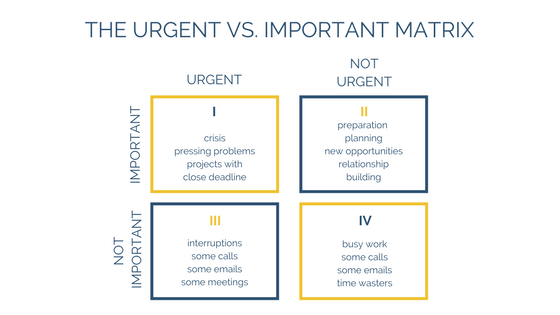
That’s me laughing my head off at my thoughts two weeks ago on this same blog. It’s also me laughing at this article about setting priorities and using the “Urgent / Important” matrix. 

urgent important matrix

So we’ve just finished our first week of online learning and I’ve learnt a heck of a lot. One of the main things being that the only way to get out of box 1 is by working roughly 20 hours a day non-stop so that you can set up systems and structures to move things into normal operational mode.

The problem is that while I’m answering urgent matters with students and teachers I’m not setting up the structures.

What I’ve managed to set up so far:

It’s basically a triage system, but unfortunately it’s hard for people in panic mode to absorb so much information, so a lot of the time we do need to do emergency surgery. I must say that Microsoft Teams has come out the hero here – besides a brief all systems down last week, it’s been pretty robust and reliable.

Now I’m going for a walk, the sun is shining and the moon is full. Everything else is shot. No blogging, no Chinese, little reading of anything substantial, basic diet and way too little sleep, no schedule.

How is everyone else doing?

——————————————————–

Matrix by The Startup on Medium
Photo by Tim Mossholder on Unsplash

Preparing for closure – don’t make it about Tech

By now the nCOV potential pandemic is world news and international schools over China are in (full) preparation mode on how to continue teaching and learning via online modalities. As part of my preparation, I’m planning to blog daily. Because it’s not about the tech. It’s about mental and psychological preparation to sit this out, continue to learn and teach (what I put up for our community).

If I were to gift every student, teacher, administrator and parent one thing, it would be a copy of Anne Frank’s diary. The new graphic novel version is particularly good. And a blank lined notebook and a pen.

Funnily enough, it struck me that if it weren’t for my librarian/tech integration hybrid role, I wouldn’t even be involved in these discussions. I’m always astounded how far down the list of people thought about, librarians lie, and education twitter folk must be tired of me answering every question on collaboration and curation and resourcing with “have you asked your teacher librarian”.

Whatever. I’ll write this from the point of view of a librarian who happens to be techie and cynical about tech, but passionate about learning and maintaining learning.

What have we put in place so far for school closure

In the days before the spring break, we created a “closure” tab in our Moodle Learning Management system in middle and high school. [We’ve been looking for an alternative for years now, but between our innovations in student learning and agency and the “China” factor, haven’t managed to move forward in that.] Within the tab we have a learning forum where students and teachers can interact asynchronously with each other. The expectation is that teachers will post a lesson each day that a lesson would have taken place (i.e. 5 times per 9 day cycle) and students check in and respond and do the assigned work. Elementary school will continue to use blogs.

What else do we have?

Regulars to this blog will know I’m a huge libguide fan and I have an extensively curated set of resources for our middle school (students, teachers and parents) that can be accessed through our main library page.  Unfortunately our 16,000 book collection is inaccessible, however we do have Overdrive/Sora, and a range of Kindle/audible books for students who borrowed the devices before the break. There are also extensive collections of books on Epic, (available during school hours) so I’ll spend a little time curating some suitable titles for each grade level to share out to students and parents.

We recently purchased a (very expensive) subscription to Newsela, that should prove a boon to students wanting to improve their nonfiction text comprehension / vocabulary and general / specific content knowledge.

Our language department has been using Education Perfect for a while now with considerable success, and we recently started a trial with their Science modules.

For our budding writers, it would be a great opportunity for them to try out things like Wattpad and other interactive writing tools.

We’ve also been experimenting with Microsoft Teams for Education, and while it’s a very promising tool, it’s a business tool that’s being adapted for Education, and there are some substantial things that don’t (yet) make it suitable to take over as an LMS. It’s moving pretty rapidly and has some really nifty bits, and if they listen carefully to their educational users it has potential to wipe a lot of things out in its wake. James Rong from Guangzhou International School is the China expert on that and worth following. Here’s his guide to setting up Teams for learning. 

Personal

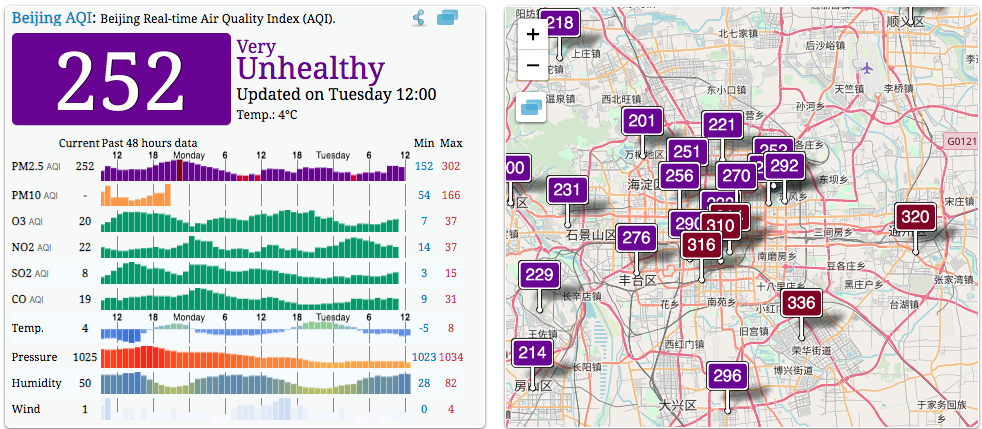
The first thing I had to do was tell myself that vacation or no vacation I have to start getting a rhythm going and some good habits. During term time I’m good at habit stacking, up at 5am, gym clothes ready to put on, work clothes & breakfast/lunch packed to go, 5.30 taxi – doing my Chinese Memrise flashcards on the way to work; 6-6.50 gym; at my desk by 7.15am. Now I have the issue that my husband is at work in Nanjing, my son is with his girlfriend. There’s nothing stopping me from doing nothing but watch Netflix or twitter/FB updates. The pollution outside is diabolical (unusually bad for a period when all the factories are closed) – so while I’d usually be up and going for a walk/run along the river, that’s not really an option.

Screen Shot 2020-01-28 at 12.37.26

Once my online meeting is done I’ll set myself some personal goals as well.

So status update:

Currently: D5/10 of the Chinese New Year vacation
Schools closed until: 17 February 2020

Overview of government site

Beijing status 1 pm.

Screen Shot 2020-01-28 at 13.01.18


Content plus

One regularly hears phrases bandied around schools such as “Every teacher is a language teacher”; or “Every class should start with 10 minutes of reading” and you’d be hard pressed to find a teacher who doesn’t agree in theory, that reading is a good thing. But then there is the “reality” of supposed too little time, too much pressure, too much content to cover and the theory of reading becomes such an abstract notion that there isn’t even a consideration of how it could be implemented.

Last week-end, Katie Day and myself gave a 90 minute presentation to around 100 educators at the Neev Literature Festival titled “Books & Beyond”. You can find a copy of the presentation here as well as other resources.

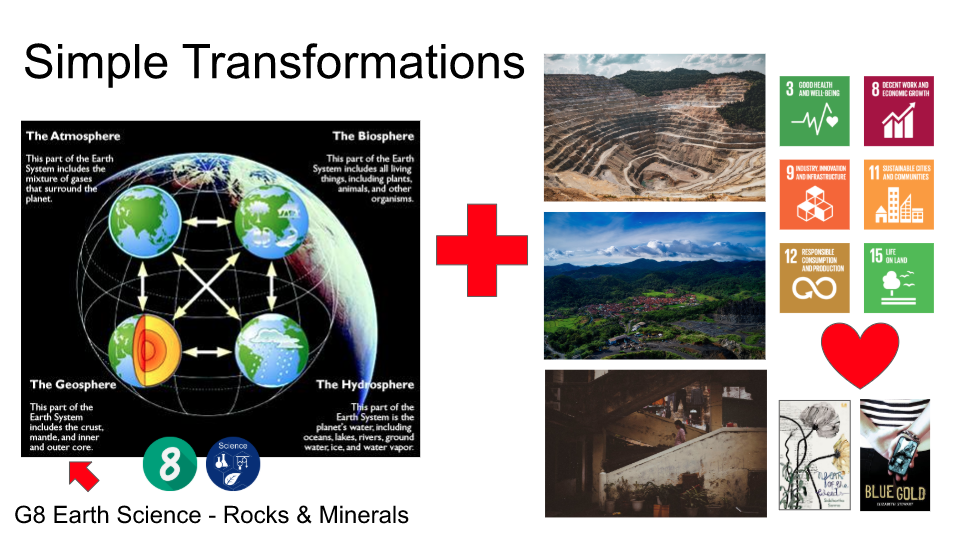
We’re on break now, and when we get back I was asked to present to our HODs for a few minutes on integrating reading into units in the middle school. I’ll probably just show this one slide:

I’d call it “content plus” – it’s from a G8 Earth Science unit that the Science team and I put together at the end of last year and they’re teaching now.

The idea is that you still have the science content as core to the unit – in this case Earth Science and learning about Sedimentary, igneous and metamorphic rocks and the minerals they contain and mining and the  products of mining. But to that you add the environmental and human impact, and the lens of the SDGs (Sustainable Development Goals).  And in order to help build empathy and understanding, add some literature.

Katie also had the brilliant idea, that she’s implemented in her school (and I’m going to be following quickly behind!), of getting good, relevant articles, stripping off the advertising etc (she uses Safari Reader View; I use Mercury Reader) putting them in binders and making them available in the library and classrooms – see slides 42-47).

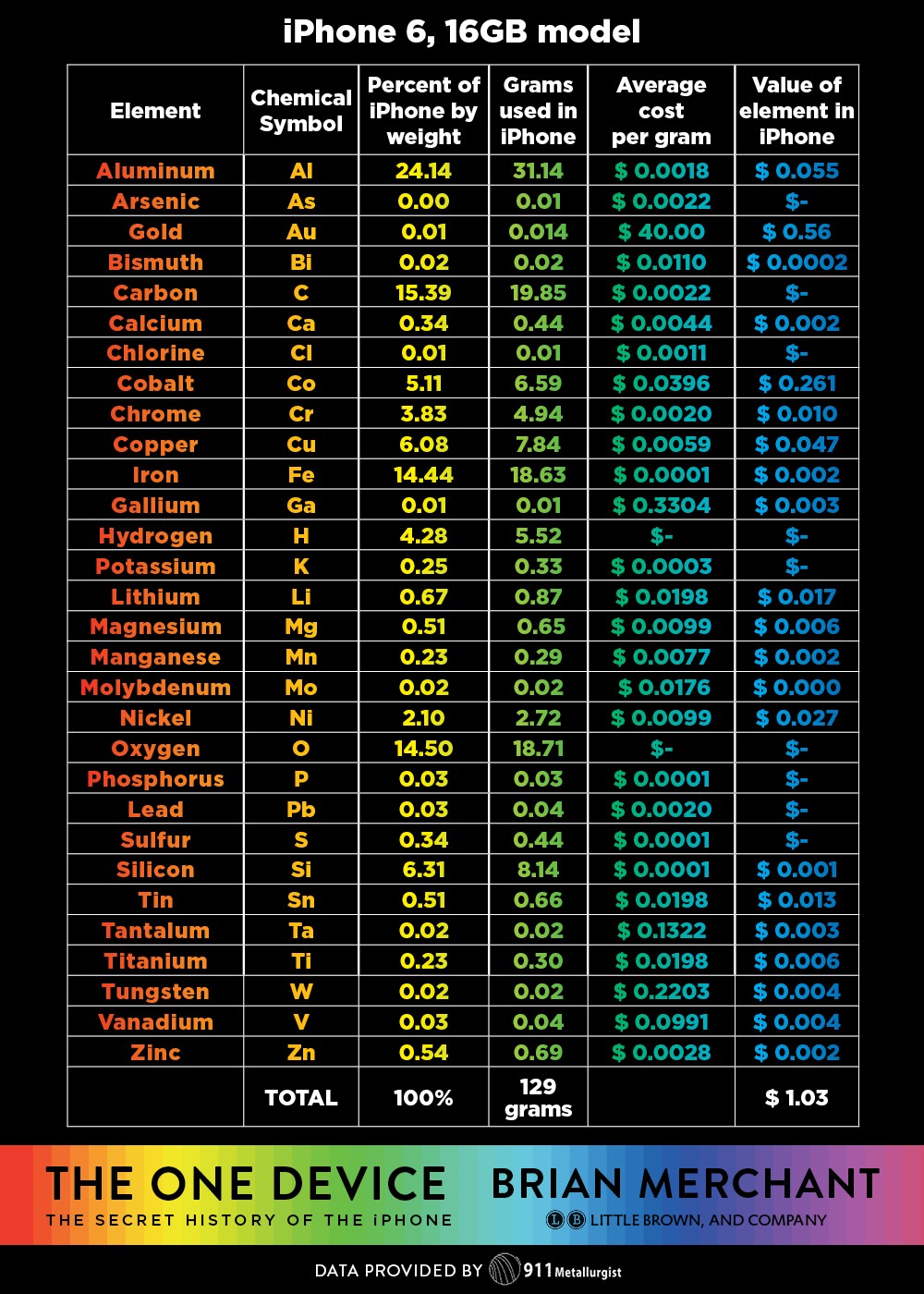
You can of course choose any minerals, but in this case to make it relevant to G8, we focused on the primary elements of an iPhone.


iPhone ingredients

Ideally, and this takes time, some of the science and or math units would be linked to Language & Literature or Individuals & Societies units allowing more time to explore literature.

In the mean time, one of the wonderful ways of adding literature into units is through picture books. In the guide we created for the Neev Festival, we made suggestions around groupings of the SDGs of the Neev shortlisted picture books plus lots of other books. It’s still a work in progress, but over time I’m hoping that for each and every global goal I have 10-20 picture books, (as well as 10-20 fiction books and 10-20 really good nonfiction books) that can easily and quickly be introduced to a class, thereby adding a very special element to learning, and truly making “every teacher a language teacher” and every teacher able to devote a tiny slice of their class to reading.

Seek and Find – breakout

In the interests of trying new things myself, and also making library orientation and searching the catalog / tracing items from the catalog to the physical copy more fun, I decided to create a library breakout.

I’d watched the “Breakout” phenomenon ebb and flow about 3-4 years ago and had always put it in the “fun, but how?” box, and this year finally decided to get into action. Our HS Edtech person had purchased the official “Breakout box” so I could have a look at that and the resources in the official site, and our ES Edtech person had deconstructed the idea and had a bunch of Stanley boxes, suitcases with locks and locks, so I had a lot to play around with. The first port of call was the official Breakout Site. Like all great ideas, this seems to be one that had its hey-day around 2015 and many of the potentially interesting links to library orientation were either broken, or the video instruction didn’t work or there were other issues, so, I left, muttering “maintenance” . I found a few good breakout description online (Library Media TechTalk; The Bright Ideas Library; LibraryStew; Ms. Kochel’s book blog;) and then, after getting an idea of how it could work, sat down and thought of what my aims would be.

  1. I wanted to highlight the “Panda” books – the annual students’ choice books that are on a huge display in the library but often get overlooked by students and teachers alike – we order 5/6 copies of each book each year and students vote on their favourite in March.
  2. I wanted students to be familiar with the library guides and bookmark the front page.
  3. I wanted to make sure students could log onto the library catalog, search for a book and then find the physical copy in the library
  4. I wanted each student to know how to use the “self-checkout” station
  5. I wanted the students to search the catalog to find more obscure items (in titles, in descriptions of books, number of books in a series etc)

With my “ISTE educator” hat on, I wanted to ensure I could work on the role of “Facilitator”:

Educators facilitate learning with technology to support student achievement of the 2016 ISTE Standards for Students. Educators:
a. Foster a culture where students take ownership of their learning goals and outcomes in both independent and group settings.
b. Manage the use of technology and student learning strategies in digital platforms, virtual environments, hands-on makerspaces or in the field.
c. Create learning opportunities that challenge students to use a design process and computational thinking to innovate and solve problems.

In this case they would be “Knowledge constructors”

3. Knowledge Constructor
Students critically curate a variety of resources using digital tools to construct knowledge, produce creative artifacts and make meaningful learning experiences for themselves and others. Students:
a. plan and employ effective research strategies to locate information and other resources for their intellectual or creative pursuits.

ATLS (approaches to learning):

  • Thinking – Creative thinking / problem solving
  • Self Management – Affective – show resilience; Demonstrate persistence and perseverance
  • Social – Collaborative – share responsibility and roles with others

Universal design for learning:

  • Multiple means of Engagement: Provide options for Sustaining Effort & Persistence
  • Multiple means of Action and Expression: Provide options for Physical Action

The guide for the breakout can be found here with the clues. Students could access this guide through a QR code on the box.  Most of them didn’t examine the box for the QR code but went straight for the printed instructions.

The activity needed at least 50-60 minutes – with some classes we had that, and generally those were the more successful classes who managed to complete all locks.

Some teams / classes didn’t complete for various reasons, and they didn’t get anything. Nothing. No compensatory prizes, no consolation prizes. The teams who did succeed could trade in their “key for success” cards in the box for boxes of “smarties” or chocolates – and the feeling of success.

Main takeaways:

  •  Students need to be carefully guided to read the instructions completely and carefully
  • Their enthusiasm and “let’s run here” inclinations needs to be tempered with “hey guys, how about stopping and thinking about …”
  • Where an activity led them to need to get a next clue from the library staff, our staff was instructed that they only proceeded if they were politely addressed and asked (part of the hidden agenda that my staff are people with feelings who need to be treated respectfully)
  • Students (and teachers) often don’t see displays and look over them – their attention needs to be brought to things deliberately
  • Don’t assume anything – some 14 year olds have never done puzzles or have any idea of what a cipher wheel is!


Libguides – back-end/front-end (3)

In the last blog on Libguides this year I just wanted to show a little bit of what is going on “under the hood” with “forcing” things to look in a certain way around the possibilities and constraints of Libguides.

Our school got a great new brand update last year, and this meant that we needed to update our colour scheme for our Libguides. The only issue how-ever is that our corporate colour red, is wonderful for many things, but there are some cautionary notes in its use on websites, including it being tiring on the eyes (particularly red with white text). In addition, young children like bright colours and different colours, so I wanted a way to introduce some colour into the Libguides without  disrespecting the hard work and thought that had gone into our branding. The way I did this was by using, our marketing designed, UOI logos and their colours in the UOI guides – which are the most frequently used sites by our students.  There I had some great colours to work with.

Screen Shot 2017-12-20 at 11.15.47

The question was how to do this without throwing away all the work I’d done previously on the guides?

This was done by using a “front-end” / “back-end” trick. i.e. all the original guides were still where they’d been, with one guide per grade for all UOI’s (the back-end), however the new front-end incorporated the colours of the UOI, the larger fonts, the missing breadcrumbs etc, that I’ve mentioned in this blog.

WWA G4 front end

On the left you can see the final product – in this case the “Who we are” units for all the grades, highlighting G4.

There are two ways of doing the “front-end/back-end” thing.

1. Redirect

The first way is to create a page that then is redirected to another page on another guide.

Advantages: 

  • You maintain the formatting and particular style of the page on the other guide, while still having a tab on the current guide to that page. For example, on each page of the UOI guides I have a “back to TK library” page, that isn’t actually so much a “page” as a quick link back to the main page. (I still need to work out how to make that a little home icon rather than the cumbersome script!)
  • You can use the same page multiple times on lots of guides without any extra work
  • You can use the same page for different target groups.

Disadvantages:

  • Your viewers are suddenly taken out of one “reality” (e.g. a UOI guide) into another reality (your home page); so you need to “open in a new tab” and then you get the tab proliferation issue
  • The page you open into won’t have the same look and feel as the guide they left.

Below I’ve put a few screen shots as to how to realise this option. And what it looks like


2. Mapped page

With this option you actually insert a page from another guide, and it takes on the style / look and feel of the guide you’re adding it to. This is the option I used for the UOI guides. That way each page would have the coloured tabs depending on the UOI colour, the large font, etc.

Advantages:

  • You don’t have to “reinvent” the wheel if you have otherwise good content in existing guides, but they don’t look so great.
  • You get to keep “standard” Libguide variable column types in the same guide (i.e. one page can have 4 columns, one 3, one 2 etc.)

Disadvantages:

  • Unless you’re pretty rigorous in your adherence to some kind of uniformity in style, you could end up with a guide that is a hodge-podge of style and content – this is something I’m trying to clean up now – each time we move onto a new UOI, I spend some time “cleaning up” the back end so it conforms to the new layout.
  • You cannot map a page that has a weird and wonderful formatting to a guide that has a plain vanilla style sheet

See the images below how to realise this – I’ve deliberately mapped a page that has special formatting to a “normal” page to show how it doesn’t work well!


Finally to end off, here are a few shots of what the mapped G4 guide looks like “behind the scenes”


For the librarians in Singapore, I’ll be hosting a few sessions in the evenings on how to create this type of Libguide in January. So contact me if you’d like to join in.  Free of charge, the only obligation is to contribute to the work on one of our ISLN committees and take your new-found knowledge and spread it forward.

Libguides – not so easy (2)

The basic page view of libguides is the option of a top and bottom row of one column, sandwiching a number of rows of either 1, 2, 3 or 4 columns. But the constraint is that then all the boxes in subsequent rows need to be in the chosen number of columns.  And sometimes – particularly for front pages / landing pages you’d like a variety of rows / columns.

So today a little bit about how to get from an idea to the actual guide with extra rows and up to six columns.

In the sketch above you can see what I’ve called “student template” On my home page I have an icon called “students” and I wanted a secondary launch page where my students could find everything they needed on one page. It’s probably a little too busy, and I’d perhaps eliminate the second row of many icons – the “go to” one in retrospect. Anyway how to do it.

Unlike in the previous post, where adjustments to a guide were made in the “Guide Custom JS / CSS” these changes are “programmed” into the guide template at the “look and feel” level.

Admin – Look and Feel – Page Layout

Screen Shot 2017-12-12 at 04.15.25

Here you can either choose a template that you’ve created, or create or edit a template. You can see the last one is called “Students Homepage Template”

The main thing in this somewhat scary process of rewiring a page is to make sure you create a plan before you start – which is why I put the plan and actual side by side.

Again, as stated in “how I built a libguide” you will need to have a web-text editor, (like Atom) so that you can try and mess up and try again without impacting your users.

I don’t have time to write about everything, so I’ll just explain the basics and then give you the bits of code to make the 5 different rows.

Overview

The libguide page is divided into 12. I think having 12 columns would be eye-boggling and since I have 6 Units of Inquiry and 6 grades, the maximum number of columns I needed was 6.  So the size of 6 columns is 2 each, of 4 columns is 3 each etc.

A few other considerations are seeing the guide on the iPad (default for my students) or phone (default for the parents). I won’t claim to have gotten that part correct, or even to understand it entirely – you’ll need to get more expert for that, but I’ve put in a best effort. My guides are best on the desktop, followed by iPad in landscape mode.

Planning

Sketch out what you want your page to look like and number the rows, and then number each column. You can see I actually have 5 rows and 19 columns. It is necessary to be able to keep track of things, as row, and each column in that row needs its own little bit of code.

This is the basic coding:

Screen Shot 2017-12-12 at 08.41.16

And here it is row by row. My apologies – I wanted it to be easy to copy and paste and originally had it in quote boxes, but WordPress does NOT like you putting bits of code into your posts, so in the end I had to screen shot the relevant bits. And I see I’ve mixed up bits of row 2 in row 1. But I’m sure you’ll get the idea.

Row 1

Screen Shot 2017-12-12 at 08.44.09

Row 2

Screen Shot 2017-12-12 at 08.44.00

Row 3

Screen Shot 2017-12-12 at 08.43.54

Row 4

Screen Shot 2017-12-12 at 08.43.47

Row 5

Screen Shot 2017-12-12 at 08.43.34

Once you’ve changed the template and uploaded it into your look and feel, you now need to apply it to your guide.

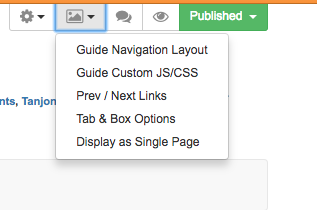
Once again this is done under the “picture” icon on the top right hand side, and this time you choose “guide navigation layout” and from the drop down box choose the template you created.

I’ve shared this template with the community, so you should be able to get the whole template and use and adjust as you want.

Screen Shot 2017-12-12 at 04.57.52

WARNING

Please do this all in a test environment with guides that are not live. Things can and do go horribly wrong and I’ve had to be “rescued” on a number of occasions by Springshare due to faulty code wiping out my ability to do anything!

Libguides: a couple of easy things (1)

Well, the response to my last post was quite surprising. So I’ll continue with a few posts on very easy things to change the look and feel of your guide.

First off though, please do consider joining the Springshare lounge – help is literally there for the asking, and no question is too basic.  You join a group based on your usage.

Secondly in response to what we use: Libguides CMS V2. If you’re on V1 still, update (free) to V2 as it offers so much more. We also have a paid subscription to LTFL (library things for libraries), we’ve just subscribed to their book display widget,  it’s an extra cost, but it’s for our 3 libraries at what I consider a reasonable cost, and they’re very generous on their trial period. Cost depends on how many of their services you use. If I had more budget I’d subscribe to their series and tagging services as well.

Finally – if you’re looking for non-video guidance on libguides, I’ve found the University Libguides to be the best, (Kent for HTML/CSS, Illinois for getting startedNorthwestern, Calgary, etc. )as they’re the most extensive and intensive users of Libguides, but I’d like to also give a shout out to RILINK schools, as their guide is also very comprehensive.

OK finally, a few easy things

Changing font size just for one guide:

Screen Shot 2017-12-05 at 04.40.41

This is done by changing the “Guide Custom JS/CSS” which is found under the picture icon.

(note for beginners: I’ve placed the coding inbetween: /* text */ : so it doesn’t mess up my blog! you’ll need to remove that for it to work – i.e just copy from <style> to </style> if you want to include more than one element just include them all in-between the style and style elements)

How to make the font size bigger in your boxes:

Since some of my boxes do need text, I’ve made them 24 point so they’re easier to read for little ones.

Screen Shot 2017-12-05 at 04.54.38


/*

<style>

/* increases font size on box headers */
.s-lib-box .s-lib-box-title {font-size:24px;}


</style>

*/

How to make the font size bigger in your tabs:

Ditto for tabs – all these tabs are 18 point – also as good practise this forces you to keep the number of tabs under control and only on one line!

Screen Shot 2017-12-05 at 04.59.14


/*

<style>

/* increases font size on tabs*/
#s-lg-guide-tabs {font-size:18px; font-weight; normal;}

</style>

*/

How to make link description under link and bigger

These elements are all links (so I can get the stats), but I didn’t want the description to be tiny and at the side, and have a dot next to the image.

Screen Shot 2017-12-05 at 04.54.03

*/

<style>


/*link description center and bigger font*/
.s-lg-link-desc {font-size: 14px; font-weight: bold; text-align: center; display: block; margin-right: auto; margin-left: auto;}
.s-lg-tn {margin-left: 0px;}

</style>

*/

How to remove breadcrumbs

that’s all the stuff that makes your header look cluttered on the left you see the standard libguide with the blue breadcrumbs and all the tags etc, on the right the “clean” version with only the guide name and top banner:

*/

<style>

/* removes breadcrumbs */
#s-lib-bc{display: none;}

</style>

*/

That’s all I have time for now! Requests and questions welcome in the comments.

And please remember I didn’t invent any of this, most of it was the result of asking Springshare or in the lounge how to do something I envisaged. Their customer service and response is amazing.