#1 Digital resources

In an attempt to blog more regularly, I’ve signed up for a challenge – so these posts will be in amongst all the other stuff I may be blogging.

#FutureReadyLibs 10-Week #BlogChallenge Challenge #1: How did you get involved in the Future Ready Schools/Future Ready Librarians initiative? Are you involved in the district strategic planning process? What is your vision for a future ready school? What makes you a Future Ready Librarian?

How I got involved

Well I guess it was just a result of being added or adding myself to a Facebook group that looked interesting. Sometimes things just happen that way.  Also since I’ve just finished my MIS and M Ed degrees I’m still vaguely interested in this type of thing, in order to keep my learning up to date.

frlblogchallenge1I think our school, as an IB PYP school is pretty future-ready in many aspects, in fact sometimes I think the cost of being “future ready” is that you occasionally need to go “back to basics” and check up on the 3 R’s and make sure you stay sober and self-critical.

Am I future ready as a librarian? Looking at the little graphic on the left, I can tick most of those boxes, or slices, inasmuch as things are in my power at least. And where not, I’m constantly nudging for change.

I’m not entirely sure if I’m on the right topic for this week – I’d note “digital resources” so I’ll write a little about that.

Curates digital resources and tools:

When I started my job at my current school I’d come from working part time in a secondary library where a large part of my time was spent creating library guides for the Middle & High School (including the IB).  I was lucky to have Katie Day as my mentor, and we had many many discussions on how to curate resources so that students had easy access to them from their laptops (they’re a one-on-one macbook school in secondary). The idea was to have digital resources in the form of videos, curated Flipboard articles and database access, but at the same time make our physical resources digitally visual and “clickable” for later borrowing as necessary.

Screen Shot 2017-03-28 at 4.55.31 PMSo, a few weeks into my new job I discovered we had an unused library guide subscription, and I immediately put it to work. Of course curating for primary is a somewhat different proposition. Immense more thought and care needs to be put into ensuring things are age appropriate – in content, in level and in access.  And I was a newbie … so it was a case of building things and hoping they would come. It’s taken a while. After the first year, a couple of teachers were on board, and now more and more are coming to expect and use the resources. My main objective is to move away from letting kids “just google it” to an idea of just like we don’t throw a bookshelf full of books into their UOI (unit of inquiry) boxes, but make sure they’re appropriate for the grade level, for the central idea, for the lines of inquiry, and may even evolve as they go through a unit, so too we can have digital resources that are similarly curated.

A few things have been a huge boon in this respect.  In the first instance I cannot express my admiration for Epic books enough. They are an absolute game changer.  In terms of depth and breadth of their books they far surpass the incumbents such as Tumblebooks. I do have some librarian type quibbles with a few of their set-up methodologies, but that’s small fish compared to what they’re achieving.

Secondly, Springshare – the owners of Libguides are just phenomenal in their ability to constantly evolve and develop their platform. I love the fact that the libguide community are so amazing in their ability to creatively curate, to combine physical and digital and particularly the fact that they demonstrate CREATION and SHARING, which is absolutely what a future ready community should be about.  Also, my desire to make good looking guides has pushed me to learning some (very basic) HTML which never ceases to impress the fine young gentlemen and ladies in my library who then realise I’m not just an old library lady!

Thirdly LibraryThings for Libraries through their book display widgets they bridge the gap between a lovely visual interface (libguides) and an old stodgy very unfriendly catalog (Follett Destiny).

As far as tools are concerned. I try to keep introducing appropriate tools to my students and to fellow teachers – but only if they are meaningful. It’s a balance. Our students are “over tech-ed” and we’re getting a lot of pushback from both parents AND students about the amount of time they spend in front of a screen. So where it saves time, hassle, helps make things neat and well spelt, sure. Otherwise it’s back to the physical.

Empowering Students as creators

I’m very fortunate to be in a school environment where there is an EdTech coach and a STEAM coach. So wild ideas for physical or digital creation can be co-shared with them. We’ve had students create book trailers, book recommendations, book spine poetry, book covers, their own books, display work pieces in the library etc.  I don’t think any of that is particularly special though – most librarians do that kind of thing in conjunction with their students and teachers – it sure makes displays easier!

Builds instructional partnerships

That part is definitely a work in progress. It’s tricky. I could blame a whole host of things – fitting in 35 classes a week on a fixed schedule, a yet to be approved information literacy scope and sequence that’s embedded in the curriculum, running, managing and keeping up to date (and renovating) a facility, curating digital resources in library guides … but instructional partnerships is a ball I’ve dropped. Or actually never really properly had in the air. It works piecemeal, depending more on relationships and invitations than being structural. I’m working on it with my fellow librarians from our other campus, the head of curriculum etc. It takes time is all I can say. And I don’t think I’m the only one saying it judging from the comments of my fellow teacher-librarians.  I beat myself up about it a LOT in my first year. To the point of tears. This year I’ve been distracted a bit by the renovation and staff medical issues. But we’re inching there.  Watch this space.
Frustrations of a librarian

And it’s not the usual stuff about being poor misunderstood under-utilized bits of the school / community.  No, the frustration goes much much further.  It’s about how information, knowledge, books, data, well just about anything is NOT being tagged and catalogued and made generally searchable, available.

What prompted this?  Well my inbox. I subscribe to a few blog sites that are, well let’s say prolific is an understatement.  One is the NerdyBookClub and the other is  Global Literature in Libraries Initiative  and the last is Gathering Books. And do you know what is terribly frustrating – I get behind on the reading. Terribly behind. And I know there are all sorts of ways of IFTTTing your inbox, but what I’d prefer is that theses consortia of writers (because no one human can be so prolific, so usually the blogs are written by teams) would just tag their posts, and make the tags obvious at the TOP of the blog, so that I know whether to read it now or leave it for later or just delete it.

Let’s take some examples that I’ve been reading today in a desperate attempt to tame my inbox:

GLLI: French Graphic Novels in translation – not categorised and no tags. If I’d been writing that post it would have had the tags of: French, Translation, Graphic Novels, Middle Grade at the very least. Then I’d immediately know that it’s worth a read, because I need to increase the diversity of my collection, so some French books in translation are relevant. My students love GN’s so that would have caught my interest but NOT if the tag included YA, since right now I’m in K-6

NBC: A look at expository literature: again, the only tag is the author and their twitter tag. Not enough. I needed to know that they were talking about: picture books, nonfiction, mentor texts, and that it included a booklist. 

Gathering Books: Fears etc. again a fabulous site with resources, but the layout and curation makes my head spin and spin and spin. It’s really hard to find stuff, there are so much great reviews going on, but then sometimes it’s poetry, sometimes it’s other stuff. The posts are allocated to categories, but don’t seem to be tagged, so if I wanted to see all the book reviews on grief, or death, or migration for example I wouldn’t be able to do so.

And then the HUGE question of where all this goes?  And it’s a really big question. Because we all know the problems of finding great and diverse literature. Of finding authors with a unique voice who are new and interesting and not part of the publishing machinery. Ones that aren’t institutionalised onto the same old same old top 10 lists.But why do we keep going back to those lists? Because it’s so easy.

Where are all these fabulous blogs curating their book lists? Where are the catalogues? Are they on Goodreads with a proliferation of shelves or on LibraryThings with 100s of tags and collections?  Where are the links and the connections and the overlaps? Even the ones working together (like NBC) seem to be working on their own.Their site has a store selling mugs for heavens’ sake. The list on the side is a list of their bloggers, not of the books / categories / shelves. Even the Nerdies – their awards page, is an unlinked list of books that is not tagged or categories in any way… where are the librarians? This is not a criticism of what they’re doing – they’re doing some fabulous things – it’s about how they’re doing it, and how much easier it could be for their readers / followers!


If we build it will they come?

In my past “homeless” week I’ve had opportunity to offer PD to my fellow librarians & library staff and to some teachers, and also to go into classrooms for a longer period of time and help with research, and I’ve had time to find, curate and put resources onto our libguides, and I’m hot-desking in the coordinator’s office. Its’ been a very informative time.

What I’ve learnt:

  • Never make assumptions about a basic level of digital literacy – just because you’re comfortable with screenshots, copying and pasting, using short-cuts etc. your audience may not be. Often they only know the very specific applications and programs (and operating systems) that they need for their specific tasks in their job.  You need to be very explicit and slow in explaining things.
  • Many many students do not know the difference between being in a browser window and typing in a URL (even a shortened one) and typing in a search term in a search box since the two have become ubiquitous to them – and Chrome as a Google product has played into that by allowing you to access either a search or an address from either. That’s something I never paused to think about, as a computer child of the 80’s they were very distinct things. This is philosophically interesting and I wonder if it impacts on understanding the nature of search and query?  I see a considerable amount of blurring generally – and if one thinks of aspects of information literacy in terms of threshold concepts I’m wondering if all these developments, while apparently making things easier are actually making them more difficult?

My biggest learning is that I have a poor understanding of how, where, why and when students and teachers access information. I’ve gone for a (at least) three times redundancy concept in providing access to anything –

  • in the OLP (Online Learning Platfrom – both on the homeroom page AND on the library page)
  • on the front page of our OPAC
  • on our Library Guides

In initial library lessons we’ve also had students (and teachers and parents – in our library bytes sessions) bookmark the 3 primary sites – the catalog, the library guides and then library OLP page. But the issues with information seem to be more deep-seated than that. I suspect that there is still confusion about not even knowing why you’d want to access anything – a kind of informational existential issue.

I’m guessing about 10-15% of the students in a class are making full use of the resources we’re providing.  Our school is probably not unique in this. I hear the same lament everywhere.  There is the saying of “meet your customer where they are” (not where you want them to be) and I think we neither really always know where they are – or we suspect they’re just on google, nor are we able to meet them there. AND OUR VENDORS ARE NOT HELPING US!  Let’s take our OPAC / Catalog as an example. Follett has finally woken up to the fact that google, and not our catalog or databases is the first place students look, so they’ve come up with a very nifty chrome extension that allows you to plug in your catalog (and webpath express) as the first search result – like below

screen-shot-2016-12-10-at-10-42-09-am

But, it only works with iOS on desktops / laptops. And we’re an iPad school (not an android / chromebook school). So it doesn’t work on iPads. So far so useless actually.

Oh, but there is a Destiny Discover App for iPads… except all it does is try to update every time you access it, and it gets to 31% and then crashes. And you can only set age / Lexile / grade level limiters to books, not databases or online resources, so it’s even more overwhelming than good ole google.

So at our last inter-campus librarian meeting we decided to try and encourage entry and access to our paid resources by making them options on our UOI guide resources page – so we’ve semi-standardised our boxes to have Books (with a link to the catalog via Librarythingsforlibraries book display widget), Videos (since Youtube is the 2nd only to google as the “go to” place for student research) and Resources (including Britannica, Brainpop, Epic Books and other curated links).

screen-shot-2016-12-10-at-10-51-56-am

The thought is, that they then don’t have to leave the page in order to go to a resource, they just click on the picture, and get to say Britannica, and once they’re there, the threshold is lower to then search for something from within there … we’ll see what the reality is.  I’ve also explicitly told them this in their last research lesson. Now to follow up and see if the usage stats change.

So what now? 

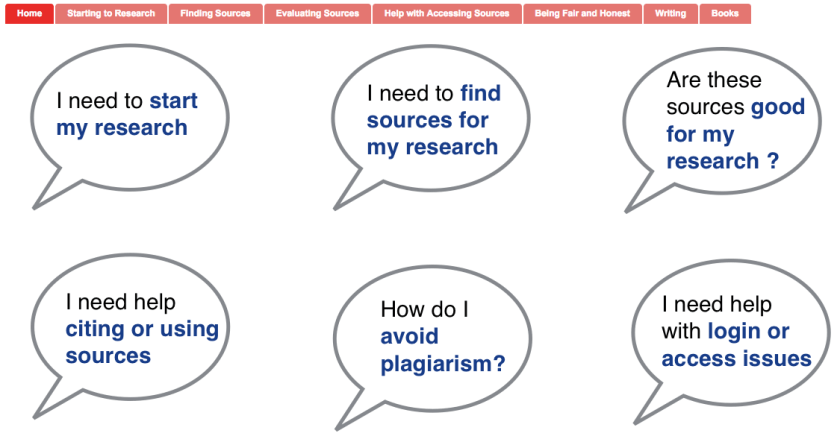
I think I need to move to a simpler and more intuitive layout – Following Katie Day’s layout for her research guide, perhaps making it student question related?

screen-shot-2016-12-10-at-11-08-41-am

At a whole different level is the services and guides that happen at Scotch College ….

screen-shot-2016-12-10-at-11-15-54-am

I think I need to sit down with teachers and students and really understand how they use information, how they look for it and where they expect to find it. Customer journey maps – something that I was thinking of as an alternative study avenue before I looked at our Blokes with Books club as my case study. Has anyone looked into that in the library context? I know people have looked at social media in library, but this is different – the physical and digital paths our patrons use to get information (or get frustrated by us). Any pointers?