Slow learning

My good intentions to blog more have come to naught, but here’s some of the stuff I’ve been busy thinking about / learning / pondering / contemplating.

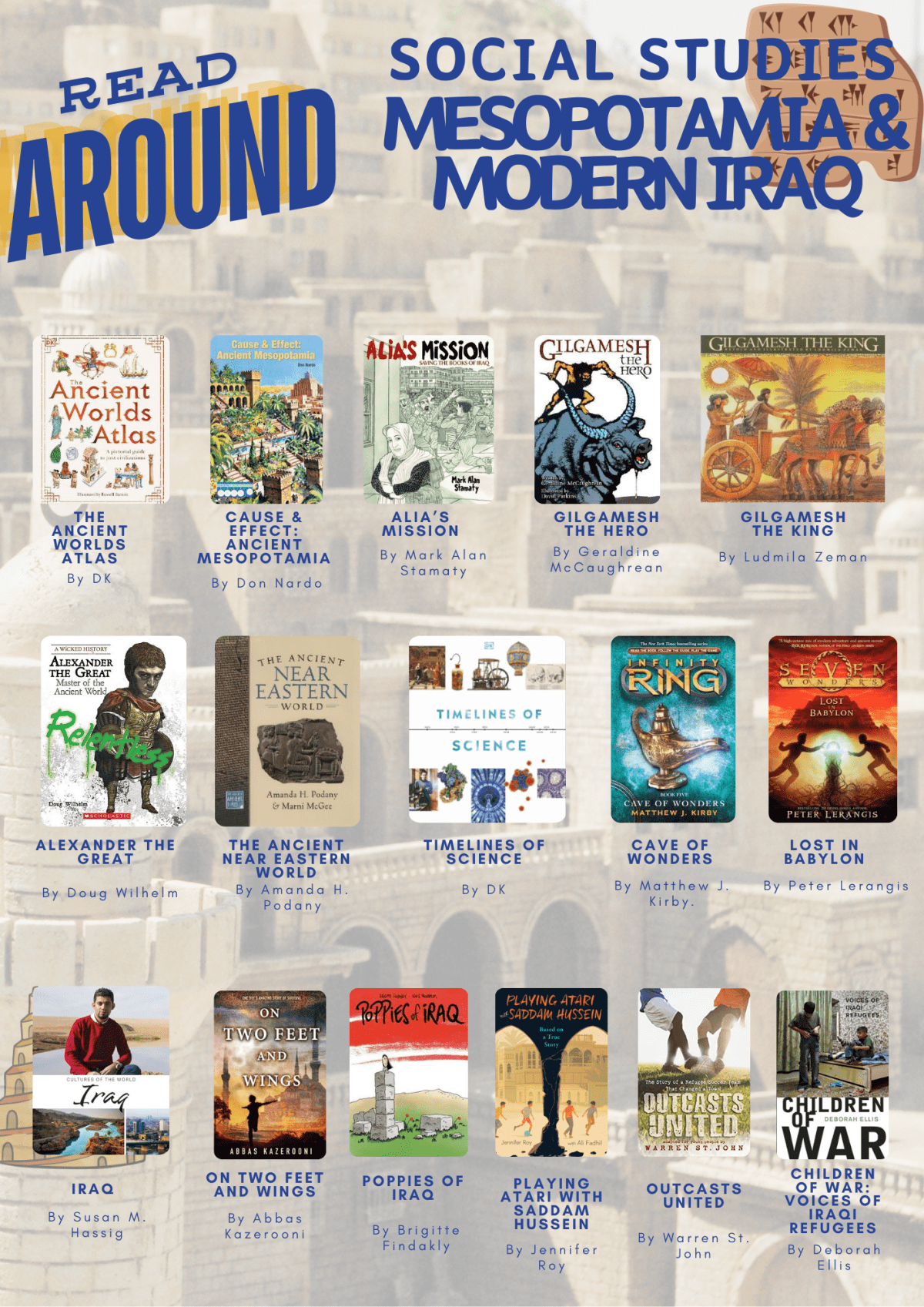
Read Around:

One of the things I’ve noticed moving from PYP / elementary librarian to Middle School is the apparent lack of curiosity in the students coming into the library. I’m sure there are many developmental and sociological reasons for this – not the least the necessity to belong and be cool. This combined with my drive to help “sense-making” in the library for our students – where a plethora of books is wonderful from a curation point of view but hopeless from a choice POV (POV is a very important thing in middle school parlance at the moment) means I’m spending a lot of my spare time (haha, not much of that unfortunately) making “read around” posters that go into look books that are a non-digital physical way of signposting books and hopefully stimulating curiosity and interest beyond what’s going on in the curriculum.

It’s still in a pretty messy form, so I’m not quite yet ready to share my Canva templates, but here are a few examples.

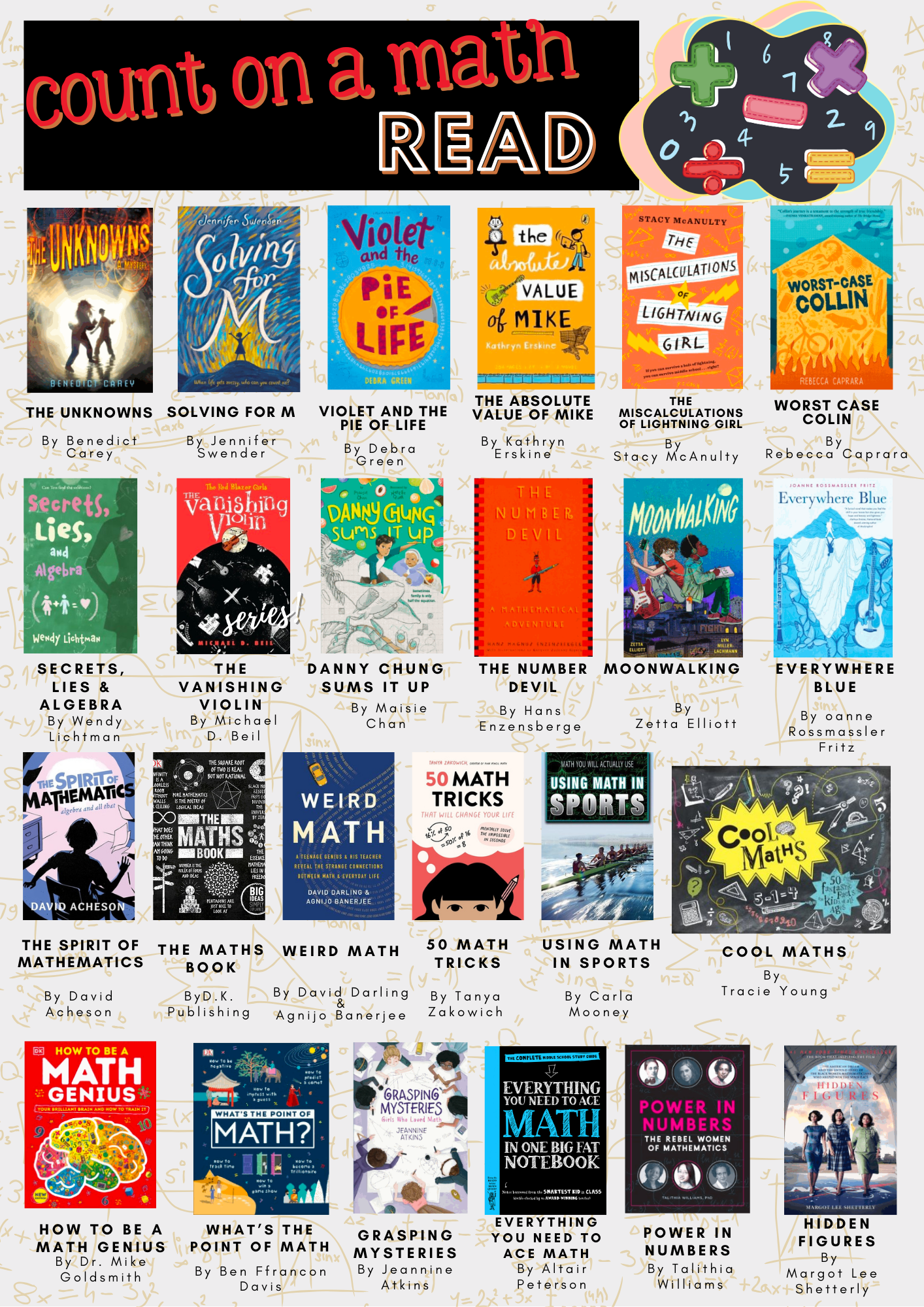
Kind of related to that Katie Day and I are busy creating the “Essential Middle School Nonfiction book list” – a “best of” in our opinion of the books now available for Middle School Students – and tagging the books along a bunch of dimensions of format, topic, geo-location etc. That should be ready soonish.

Learning and AI

Again, with my partner-in-learning, Katie, we’re preparing a talk for educators and parents for the Neev Literature Festival (if you’re anywhere near Bangalore India, that’s the place to be next week – an amazing line up of authors and speakers).

I became somewhat interested in AI, Blockchain and learning and matters related in the summer of 2018 thanks mainly to an article by Jeremy Howard on learning Chinese since at that point I was still in China and actively learning Chinese and I’m always fascinated and very fond (in an intellectual sense) of people who were climbing that mountain with me – this is a more recent podcast featuring him on the subject. I’ve since moved on to learning French and German using Duolingo – which I’m still somewhat deeply sceptical about, but more or less sucked into a learning streak which I suspect is more algorithmically behaviourally induced than true learning. I remember moments learning chinese when I literally was feeling my brain creaking – something Duolingo hasn’t managed to re-create.

Where am I now? Well, AI has progressed a lot faster than my interest in it, if I am completely honest. I’m not sure if it’s a result of a fundamental distrust of whatever the “latest thing” is, or I’m joining Socrates and Plato on a distrust of a new technology – their view being “writing is a fundamentally representational activity. The act of writing only records ideas; it cannot generate them” and I’m with the AI camp saying “AI is a fundamentally regenerational activity; it can only regenerate ideas; it cannot generate them”. Actually I must say I disagree that writing only records ideas – through the process of writing and researching in order to write I do think I generate ideas … maybe not world-changing ones, but ideas nonetheless.

A few things I’ve been watching / reading that I think are of use have been:

  • Benjamin Riley’s “Resist the AI guidance you are being given” – it’s the AI equivalent of the very good Cult of Pedagogy podcast episode of “Is your lesson a Grecian Urn” and boy there are still a lot of Grecian Urn lessons going on nearly 10 years later!
  • Rory Sutherland’s “Are we too impatient to be intelligent” two quotes I particularly liked were “…a problem, I think, which bedevils many technologies and many behaviours. It starts as an option, then it becomes an obligation. We welcome the technology at first because it presents us with a choice. But then everybody else has to adopt the technology, and we suddenly realize we’re worse off than we were when we started.” and “there are things in life where the value is precisely in the inefficiency, in the time spent, in the pain endured, in the effort you have to invest.” – thinking about what he is saying resulted in the title of this blog.
  • Jay Caspian Kang’s “Does A.I. Really Encourage Cheating in Schools?” with this message “school isn’t about creating new scholarship or answering questions correctly—it’s about teaching proper work habits. A young person who takes the time to go into a library is more likely to develop the types of work habits that will allow him to find accompanying bits of information that might be useful in creating a novel, an algorithm, or a convincing argument. Setting aside the obvious offense of dishonesty, the problem with cheating isn’t so much that the student skips over the process of explaining what they learned—it’s that they deprive themselves of the time-consuming labor of actually having read the book, type out the sentences, and think through the prompt.”
  • Joshua Rothman’s “What Does It Really Mean to Learn?” – I really loved this article about Leslie Valiant’s book “The Importance of Being Educable” – our ability to learn over the long term. I started reading the book but think the article actually covers the most important points very well.
  • And then my favourite so far (and imminently practical) Dr. Barbara Oakley: Using Generative AI to strengthen and speed learning. As a side note I loved her books “Mindshift” and “Evil Genes” and this talk reminded me to read more of her.

I’ve also been reading around various academic papers in search of some kind of a framework within which to think about how to teach critical information literacy towards AI. There are a lot of very interesting “click-bait” titles, but so far not very much in the way of substance – so watch this space.

Slow learning

Finally when I don’t have much time left – the whole point of me writing today – you know how we’ve had the Slow Eating / Food Movement and Slow Travel / Tourism and Slow Fashion etc etc. There is apparently a slow education movement which seems to have had it’s hey-day around 2012-2014.

I’m wondering if it’s time for a renaissance. At least in the conversations I’m having with some educators we’re moving back to using nonfiction books for research, printing out articles from databases, using fewer resources more intensively and other such retro ideas. Faced with 22 students aged 10-12 learning about inventions in Mesopotamia I am resisting using the phrase “skim and scan” before they can actually read a paragraph, a page, a chapter and be able to tell what the main idea is and how that relates to what they already know and what they think they still need to find out.

It’s been a little while – but I’m going to direct you all to what I consider to be one of the best series of articles the NY Times has brought out – Errol Morris’ “The Anosognosic’s Dilemma: Something’s Wrong but You’ll Never Know What It Is” about the Dunning-Kruger effect “When people are incompetent in the strategies they adopt to achieve success and satisfaction, they suffer a dual burden: Not only do they reach erroneous conclusions and make unfortunate choices, but their incompetence robs them of the ability to realize it.” besides American (and other) politics, there are few places where this is more rampant than in middle school. It’s not our role as educators to point this out to our students, but rather to bring them to the point where we create the environment where they are nudged into making the right choices – at the very least around learning and to commence that journey of being able to glimpse the horizons of knowing what they don’t know.

How to WINN in the new school year

Part of my vacation time is usually spent doing personal learning and preparing for the new year for both my students and for how I can impact teaching and learning for teachers. Last year was my first in a new environment – both in terms of level (middle school rather than primary) and country/school (Beijing, China). This year I’m preparing with somewhat more hindsight and the fact that we have 12 new teachers starting. This post I’m going to focus more on how I hope to support teachers.

Last year, my predecessor very kindly typed up a long list of answers to my 100s of questions to help guide me in the new position. It’s something I refer to from time to time even further into the year. This year I compiled a “newbies” guide with the help and input of all my fellow (last year) new teachers, and the rest of the staff on the nitty-gritty things that we wish we’d known before starting. We sent it out into the world and based on the feedback added additional information. It seems to have had some success with 1,282 views since it was created in May. But it’s a lot of information to digest.

Today I stumbled on the videos (and book) of Nick Shackleton Jones via a tweet on a blogpost of his (yes, rabbit hole – but this time a good one). This has definitely changed my whole view on how to approach supporting teachers, and perhaps even how to work with students.

A brief summary of the takeaways of the videos

Part 1 – distinguish between content dumping (my newbie Libguide – and other Libguides) and performance support. In order to give performance support you need to understand / analyse what people are trying to do and provide resources that have DESIGN & UTILITY.

Find out from your audience WHAT I NEED NOW (WINN).

Part 2 – this session is particularly interesting for on-boarding and knowledge sharing. The basic elements are things that people need immediately (how to use the computer); advice from peers, understanding how things connect together; factsheets; one page guides; checklists.

Part 3 – discusses the affective (emotional) context of learning and how to alternate between providing resources (when the audience has a strong emotional response to the information) and experiences (when the emotional response / interest is lower). The 5Di design process is introduced (define, discover, design, develop, deploy & iterate). Of particular use in my context was the CONCERN-TASK-RESOURCES model. I think that is a great way of deciding what resources to focus on by working out the concerns of the audience, relating them to tasks and then providing the resources that can help with the tasks.

I can see this working really well for designing learning experiences for our Day 9s to ensure that they are student need rather than teacher driven.

So, what I thought I’ll do is during the newbie week and first week of teachers back have daily debrief sessions on a pop-in or digital basis called WINN where teachers can quickly and briefly address what their concerns or tasks are that they need immediate help with and to build up the resources they need. Pop in is easy enough, for the digital I’m thinking of using our “ask” function of Libguides that I just started populating at the end of last year, so that the questions can accumulate into a knowledge database.

========================

Here is a longer video on “how people learn” worth the 29 minute investment – and a link to the book “How People Learn : Designing Education and Training that Works to Improve Employee Performance” I have a small gripe on the “employee performance” part of the subtitle – as I think it’s pretty universally applicable – but I guess that’s his background.

Header Photo by Felix Staffler from Pexels

How I built a libguide

aka I think I’d better think it out again …

Over the summer I completely rethought our school library libguides, and I’ve received quite a few positive comments and questions as to how I made the guides. Unfortunately there is not quick and easy answer, as the process resembles more closely this TED talk on building a toaster from scratch than a few lessons on embedding photos, files and links.  So a little warning that things may get a little geeky.

When I started building libguides at UWCSEA-East nearly 5 years ago, I really had very little idea what I was doing.  Content wise I was OK – I’d interview the teacher or head of department who wanted the guide, or Katie Day would tell me what she had in mind, and off I’d go finding interesting bits and bobs, do some extensive research and put them in a guide in some kind of logical flow and predictability.  We started with making IB subject guides, really something to help students think about and around their subject and to perhaps pique interest in an area for their Extended Essays. Then teachers would ask to expand on a specific area (like development economics).  Anyway, when I left to take up a position in a PYP library at CIS, I resurrected our libguides and continued in the same line with the thought of uniting our digital and physical resources. Except primary and secondary are two very different ballgames. Aside from the obvious content issues – videos and links need to be age appropriate, the way that younger students access web-based information is very different to older students.  And so my journey began.

During the LKSW at UWCSEA-East last February I attended a workshop by Brad Tyrell of Scotch College. Now Scotch probably has the most awesome looking libguides around.  They also have a team of developers and designers and IT-type specialists and vastly more staff than most libraries could dream of.  So let’s say they’re the Koenigsegg CCXR Trevita, and up to then I’d been the Tata Nano, I reckoned there had to be a way I could get to at least a Toyota level, or maybe a basic Tesla.

Unfortunately that workshop was a little too basic, but I did learn a few tips and tricks, including to watch out to use items that were counted statistically (books, links, databases) rather than just RTF and images, so you could have an idea of what people were finding useful / using and what not. There were also good hints on workflow and guide organisation.  After the workshop I jazzed up my homepage and it looked like this:

Old libguide

While it was colourful, and to my mind logical and easy to access all the bits and pieces (plus each box was a link rather than rtf, so I could track where users were going), the overwhelming response from students when I and teachers asked for feedback at the end of the term was that there were “too many words”.

This is a common refrain in schools about just about anything with words – from websites to encyclopaedias, to books and beyond. In fact my teenage son introduced me to the concept of TL.DR (too long, didn’t read) along with a chrome extension to take away the grief of wordiness.

Luckily it was just in time for summer break and I had plenty of time on my hands to dig into this.

As I’m no longer a child, and fully, if not hyper- literate,  I needed to understand a bit more about children and websites. There were more than enough articles on this, with this one from Canva the most useful. Conclusion after a few day’s reading was basically to go bright, use images and icons and moving and clickable things.

The next step was to brush up on some HTML and CSS. I’d previously run through some tutorials of W3Schools that were really good, and in fact used their scratch pads to do the limited coding I’d needed for the previous libguides. But I needed to think not just coding, but coding and kids. So I did a basic course for kids, kind of because I thought I’d need to think like a kid.  It actually was a brilliant way of seeing the relationship between HTML and CSS in a very tangible way.

Next up was looking through lots of Libguides. Luckily Springshare, the purveyor of Libguides is excellent at sharing information and customer service, as are most of the librarians who use Libguides – making their guides (most of the 550k) open to access and copy and use. They have a collection of their “Springypicks“. I saw one I rather liked, the Mary Baldwin university library, but couldn’t figure out what they were doing. So I reached out to their librarians, and Anya Jones was online at the time and wonderful enough to do a google video-chat with me, to point me in the right direction of the knowledge I was missing to go further. How important knowing what you don’t know can be!

So it was back to the learning site, and off to SpringyCamp. SpringyCamp is this awesome online learning platform provided by Springshare free of charge whereby at certain times you sign up for whatever course at whatever level you’re at and they show you how to do stuff. Since I was in Europe there was only a 6 hour time difference rather than they usual 12 hour night and day problem so I could attend one live. The best part is if things went too fast, or you’re in the wrong time-zone you can watch the videos afterwards. A tip in this regard – I usually watch the video on my iPad while “doing” the stuff on my laptop – this means I can pause, try out, rewind, retry etc. otherwise it’s in one ear and out the other by the time I try to implement anything.

Then I discovered how primitive and naive I’d been, and moved one step closer by downloading a web-text editor (in this case Atom) that made my life infinitely easier. (Ok, I was really starting from zero, so don’t laugh).  The most useful course I followed on the Springshare Video site was CMS Libguide / CSS.

Since it was vacation, I had the luxury of two teenagers at my disposal, and although they are way past primary age, they could critique what I was doing, and my daughter was put to work helping me select icons (mainly  flat iron and envato) to purchase, or to make icons by adapting graphics from noun-project (like the ones she made for the PYP site). This helped me through a short-cut not have to add yet another tool into my kit – learning adobe illustrator.

The last bit involved using LibraryThings for Libraries book display widget to have scrolling book covers. Luckily this was something I’ve used before, so it was just a case of uploading our most recent Marc records and creating separate widgets for new books (front page) and the various other pages and familiarising myself with their upgraded version.

Once you have all the tools and skills at hand, there is of course a fairly long process of trial and error and planning as to how to put it all together, some of that just plain old pen and paper. And even then you keep tweaking things as it doesn’t quite gel or look like you’d like it to.

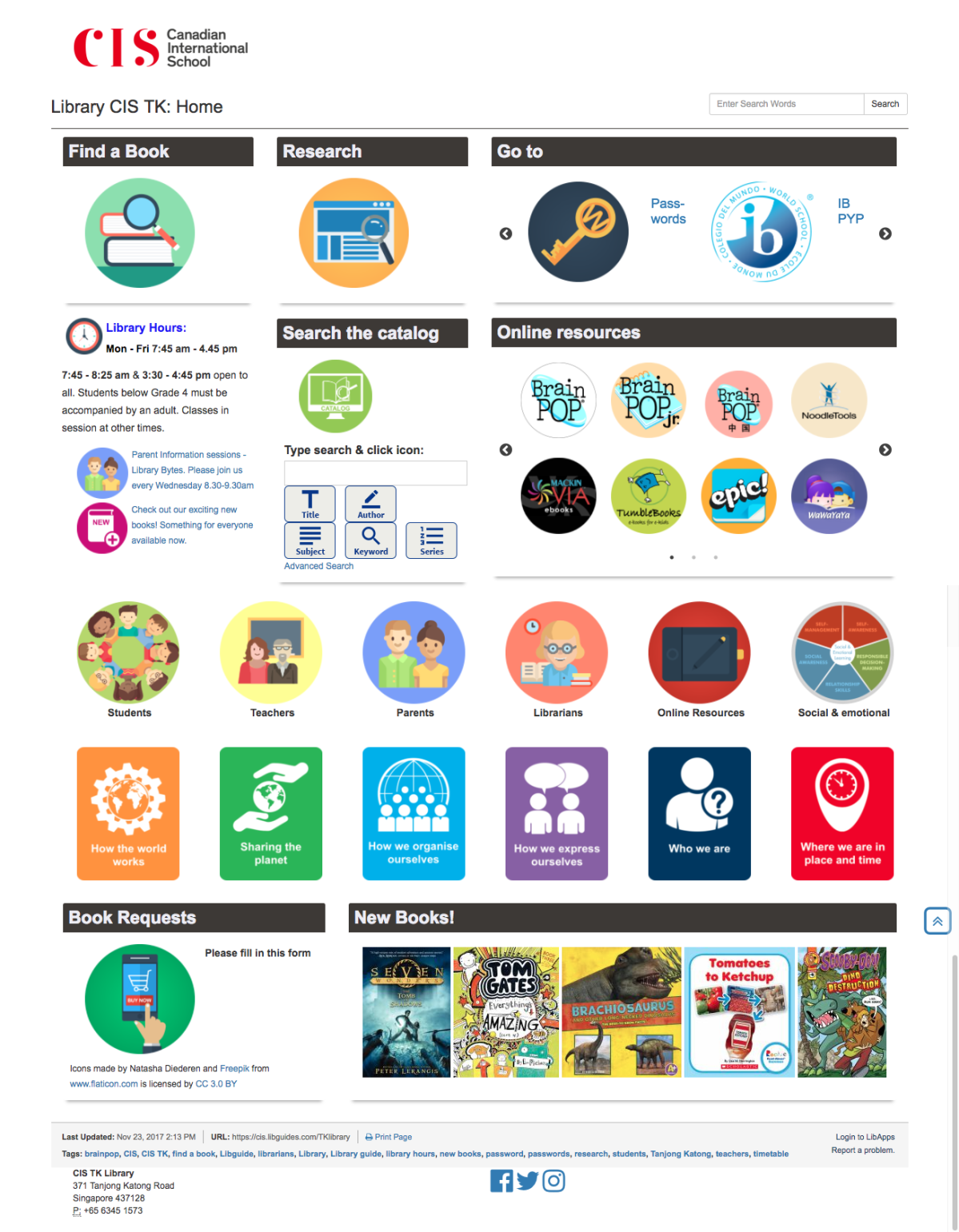
Here is the end result for the home page:

TK library front page


Of course changing one thing means you really need to change everything, because you’ve set new standards for the way things have to be.  This is time consuming, but you also have the advantage that it gives you lots of practise, so you don’t forget what you’ve just learnt. I also revamped all the UOI guides as they’re the most frequently used, and

G6 HTWW


I’m moving my way through other guides. And they’re not perfect, every time I look at one I need to change a bit more. As we move towards new unit’s I’m updating the old guides so that the look and feel is the same, that the same elements can be found in the same places, and responding to student and teacher feedback. Some guides are a lot longer with more information on them – depending mainly on how intensively they’re used by the teacher, and some are more perfunctory – basically just a minimal presence because they’re not used / valued as much. That’s fine by me.

When I tell people who ask that I do libguides inbetween everything else, often in 10 minute chunks of time it is completely true. I don’t have a lot of time for this, which is why I do set-up and brain work in vacation time, so during term time is just filling work.

The next phase of the process has been to do some staff development so that my staff can take over the maintenance of sites. For example every time we have a new batch of books, they scan the ISBN’s into the “new books” LTFL widget, delete the previous list and my front page is automatically updated. While I was waiting for a new Chinese assistant, I also roped a bunch of Chinese speaking mothers (see my point on 10% in my last blog – one of them has a degree in Chinese literature) to read through all my Chinese picture books and put them into resource lists based on the PYP essential elements. These could then be linked to the PYP guide.

As a school with bilingual classes we have an increased responsibility in the library to ensure there is equity in the provision of help and resources to our Chinese classes. This is easier said than done. My new Chinese speaking assistant has been tasked with a more extensive involvement, including creating the Chinese Guides, as that is not something my limited Chinese extends to. The great thing is that they actually love this work, finding it more creative and fun than the check-in/check-out and shelving tasks that is their usual daily fare. pyp concepts

The next next phase for me is student curation. We’ve done a little of that, for example by asking G6 students to recommend the 3 best sources of information during their exhibition project.   Last year we also started experimenting with Flipboard for the curation of articles by G5 & 6 students and teachers, and then embedding the Flipboard into the guide . We could do a lot more in that respect, but we’re being cautious with articles vetted by teachers or myself before being added.

Of course 4 months later I’m not entirely satisfied with everything. There is still a lot of work to be done on consistency and getting older guides up to standard. I need to work out a better process of guide building and handover. And after chatting to Kim Beeman at Tanglin, who is redoing her guides – albeit with a good number of dedicated qualified design and technical staff, I know I need to delve into UX.  She’s recommended a couple of web accessibility evaluation tools such as mouseflow, WAVE, and crazyegg. But that will have to wait for the Christmas break, as this is just a small part of my job!


How to get free PD

5968774554Quite a few schools in our network have cut-back on funding for professional development and have either started limiting the time off or financial support for PD. This is extremely disappointing, as PD can be the lifeblood of educators, and dare I say, particularly for teacher-librarians with their often solitary status within a school.  There is however a vast range of ways to get “free” PD in that it will only cost you your own personal time. Here are a few suggestions for things I’ve tried out.

Teach meets

Founded by one of my lecturers in designing spaces for learning, Ewan McIntosh, Just about every major city in the world holds TeachMeets. Basically they’re gatherings for teachers where very brief (5-10 minute) presentations are given on a variety of topics, preceded and followed by some social chitchat and networking. Usually the topics are very practical, actionable “hacks” or ways of solving common teaching questions. In Singapore they’re run by 21stC learning and seem to tend towards the geeky/techie side of things.

Another form of this, for PYP educators is the PYP Connect events. These are run by the Singapore Malaysia PYP network, and consist of longer workshop events hosted by one or another PYP school. Ask your PYP coordinator about the next one in November 2017.

Pros: You get out of your space, meet educators from different specialisations and different schools.

Cons: They’re only a few times a year, and if you can’t attend that’s it.

Read a book (or a blog)

Yup, this can be really really simple. The only tricky bit would be which book to read and finding the time to do so. Basically you need to find your reading tribe. People who share your educational and life philosophy and who are readers and find out what books are shaping their thinking. My criteria for this type of book is one where a chapter can be read and absorbed in the 15-20 minutes between getting into be and my eyes falling shut from exhaustion.  At the moment I’m really pleased I found Kylene Beers and Robert Probst’s books

36094448154though an ex-colleague. I started by reading Reading Nonfiction and I’m currently on Disrupting Thinking and both books have given plenty of food for thought and initiative for me to reflect on my teaching and literacy practices. They’re just the right balance of practical and thoughtful.

More powerful than just reading a book, is reading with someone or a group of people so that you can share ideas and more importantly, put those ideas into practice. At our school we’ve started running professional book clubs, started by our principal last year when we set up our ODC (Outdoor discover centre) with “Dirty Teaching” . This year we’re running around eight different groups, each with their own focus, based around a book of note. The group I’m in is doing “Making Thinking Visible” and we have (surprise, surprise) a particular focus on using picture books.

There are plenty of lists of books to read. A word of caution – of course the books on the list reflect the culture of the country / organisation from whence the list is coming. Here are a few: The Guardian (British / Commonwealth focus); Fractus Learning (what I’d call aspirational / holiday read books – not much to put into practice immediately); We are Teachers (USA – more focused on the whole child / success).  Funnily / ironically enough there doesn’t seem to be an up to date list for teacher-librarians – the last one was a Goodreads one from 2012, which was pretty meh. Maybe because we’re reading all the time? Maybe it’s time to make one! (Suggestions in comments below).

I know blogging is so 2013, but I still do it, and I still subscribe to a few good blogs such as HapgoodSLJ blog network, Stephen Downes, Global Literature in Libraries, Gathering Books, and Mrs. ReaderPants. Here is a list of the supposed top 50 librarian blogs  (Somewhat USA focused, many not recently updated and nope, I’m not on it)

Pros: You can do it any time / any place. Most books are quickly actionable. A lot of books are now available as audiobooks – so you can multi-task – listen and do exercise etc. (but I need to stop and write notes!)

Cons: You need to dedicate a regular time to reading so that you don’t lose the thread. If you want to join a group, you need to structure it so that you can meet regularly.

Listen to a PodCast

There are so many excellent PodCasts out there – both educational and for general edification. I’m constantly torn between listening to podcasts and to listening to audiobooks. And the best thing is – it really helps your general knowledge, so you and awe your students from time to time!

Some of my favourites for education: The Cult of Pedagogy; Truth for Teachers; 10 minute teacher podcast. 

Unfortunately, again teacher librarians are not out there on the podcast scene much, and some of the initial podcasts are not kept up, but to make up for it, there are lots of good book podcasts. My favourite is All the Wonders, because they often feature diverse books and KidLit Radio. The SLJ has The Yarn (which I haven’t listened to but will). Here is another list from The Guardian.

General edification podcasts: 99% Invisible; The Allusionist; The Infinite Monkey Cage; You are Not so Smart; Stuff Mom Never Told You; TED radio hour; RadioLab; Invisibilia; Hidden Brain; Freakonomics; Sources and Methods; and my current favourite In Our Time.

Pros: Anytime, anywhere, keep up with amazing knowledge and information

Cons: So many to choose from. Easy to get behind and iTunes new format for podcasts is AWFUL.

Librarian Groups

Here in Singapore we are most fortune in having the ISLN with regular meetings and access to PD. Besides our quarterly meetings we have regular meet ups on a social basis, and pretty much all our libraries are open for job shadowing and visits. When I was still in training and working part-time, I regularly asked librarians if I could come and spend a day with them, and even now I’m working full time, if my holidays are different to that of my colleagues I’ll often ask if I can come and spend a morning or afternoon with someone, just trailing them with lots of conversations and questions and seeing best practice. Likewise, I encourage my library assistants to spend a day at other libraries from time to time, chatting to the library assistants and picking up some tips and tricks. Likewise, while on holiday, it’s easy to invite yourself to a fellow teacher librarian’s library to have a look around and chat. I’ve recently been to Taipei and popped into TAS’s lovely libraries for a few hours.

Pros: Convenient, local, low barrier

Cons: some librarians do operate in remote areas, or places with vast distances between the libraries making this more difficult.

Webinars

Actually the idea for this post occurred as I signed myself up for a webinar with SLJ. Added to this one could put short courses on YouTube (how I intend to master photoshop, Adobe Illustrator and Adobe InDesign this vacation)

Pros: Most webinars are free, almost all of them have both a live and “after the event” viewing option – ideal if you’re not on American Time.

Cons: The “free” sometimes comes at a cost of at least some of the time being devoted to someone or another trying to sell you their product, but if you already have the product, it can deepen your understanding of how to best use it.

MOOCs

While MOOCs seem to have lost their lustre, they’re still incredibly good for learning stuff. It’s just that the format is so limiting. But be that as it may, you can audit most course free of charge with a small fee to be “qualified”. Over the summer my daughter and I did the exceptionally good 8 week course “Humanity and Nature in Chinese Thought” an introduction to Chinese Philosophy. It has nothing to do with librarianship but everything to do with life and living in a multi-cultural and therefore multi-philosophical environment. I’m currently enrolled in Making Sense of the News: News Literacy Lessons for Digital Citizens; also through HKU, and I’ve done Jo Boaler’s How to Learn Math. No I’m not a math teacher, but I am a math human with math learning students and children. 

Pros: Some excellent content; self-paced; you can watch the videos at 1.5/2x speed. Huge variety of offering by some exceptional teachers.

Cons: Video based learning is not my favourite medium. Some courses are only open for a limited time frame. The hype hasn’t quite been realised with the format. Time.

Skype and GoogleHangout

I’ve done this a couple of times in the last few months. During the vacation, I saw an awesome Libguide and I was determined to update my school’s libguides. So I emailed the librarian, and next thing we were having a google hangout and she was screensharing with me showing how she’d done it all!

Then last week I was worrying that I wasn’t using MackinVIA properly, and again reached out to someone who screenshared her set up. I’ve done some libguide training to a fellow librarian who was sitting next to me, while screensharing to another librarian remotely.

Twitter

Great for reaching out to people and keeping up with trends of what is going on. But hard for searching and following threads when you enter part way through is horrid.

Facebook

I put this last because it is truly terrible. The possible worst place in the world to put up information and exchange knowledge. It gets boring and repetitive as the same questions come up time and again. It’s awful for searching, it can be mindless and stupid – why on earth once a question has been asked do people persist on answering it again with the same information?? But the various librarian groups I’m in, are very useful, albeit that I need to keep / store the links immediately to Evernote.

Facebook groups I’ve joined include: Int’l School librarian Connection; SLATT; Global ReadAloud (only really active around the GRA activities in October/November); Future Ready Librarians (tends to be FollettDestiny dominated – the irony Follett and Future!); ISTE librarian Group (not very technological – too much talk about book lists);  ALATT (ALA think tank – great for if you are ever mired in self-pity – there are about 30,000 other librarians in way worse a situation than you could ever imagine – ignore the cat photos and memes and sit back and enjoy the political rants on all sides of the US spectrum).

Pros: Amusing, informative, occasional good advice / links; pretty display pictures

Cons: Frustrating format, hard to save; hard to search, huge time suck.

Transformation and Autonomy with a twist: from information to learning – Critical Reflection INF530

It’s been quite a ride this INF530, and as they say “it ain’t over until it’s over”, I have yet to complete my digital essay and enter that huge time warp black hole of combining words with media and images in such a way that it enhances rather than distracts, compels rather than confuses.


INF530 key wordsLooking back on the topic headings I decided to make a wordle, to see things with a little visual perspective. What jumped out was “information” and “learning” and I had to think back to previous courses where the nuances of data, information, knowledge, wisdom were picked over in meticulous detail (Barrett, Cappleman, Shoib, & Walsham, 2004; Hecker, 2012; Pantzar, 2000; UNESCO, 2005) or the role of the teacher or school or librarian is discussed, particularly in the light of information literacy (Eisenberg, 2008; Mihailidis, 2012; O’Connell, 2008; Sheng & Sun, 2007; Wallis, 2003). Yes these are all part of the picture, but the words that I’d like to contribute and focus on are not there, because they are implicit and essential rather than explicit. Integral to information and learning are transformation and autonomy.


Firstly transformation, it’s synonyms (conversion, metamorphosis, renewal, revolution, shift, alteration) and its’ derivatives:

  • the doing – to transform,
  • the process – transformation,
  • the subject and the state – transformed, and
  • the agent – transformer.

And the twist, because in education we are simultaneously the agent and the subject, the initiator, the process and the end state. We cannot “do” without “being”. And that is the value of plunging into a distance-learning course that takes one beyond the mundane and everyday into personally being transformed and feeling the simultaneous discomfort and thrill of not always being in control of the process or the outcome. Sometimes the truth is found in the antonym – stagnation and sameness. The resistance to change that saps energy rather than re-energises as transformation does.


Conole (2013, p. 61) stated “We have to accept that it is impossible to keep up with all the changes, so we need to develop coping strategies which enable individuals to create their own personal digital environment of supporting tools and networks to facilitate access to and use of relevant information for their needs.” That is part of the solution, the other is finding one’s place in digital and physical learning ecologies (O’Connell, 2014; Vasiliou, Ioannou, & Zaphiris, 2014; Wang, Guo, Yang, Chen, & Zhang, 2015). Yes ecologies, because we are, and our students and children will be “shape shifting portfolio people” (Gee & Hayes, 2011) whether we want to acknowledge and embrace the fact or not.


Which brings me to the second of “my” take-away words. Autonomy. It is autonomy with a difference – autonomy within communities and networks of our own and others’ making. As Downes (2012, bk. Connectivism and Connective Knowledge) puts it “knowledge is distributed across a network of connections, … learning consists of the ability to construct and traverse those networks”.


However without the aforementioned transformation we can’t have the autonomy. It is an autonomy hard won, through dint of our own efforts, the pushing and pulling and attraction of our teachers, mentors, peers and heroes. Autonomy feeds off motivation and self-regulatory control (Kormos & Csizér, 2014). The latter including commitment, meta-cognitive, satiation, emotion and environmental control (Tseng, Dörnyei, & Schmitt, 2006). Ironically we need others to attain autonomy. Autonomy is not independence but interdependence, not being on your own, but being part of a larger community of learners all together on individual journeys. It’s the forums, blogs, comments, feedback and Facebook posts. The emojis, irrelevant and irreverent tweets; words of encouragement and critique, ideas and suggestions that propel us forward and backward and around in circles – but ever expanding circles and cycles of improvement and transformation.


Thank-you to my peers, my course co-ordinator Judy, those who went before us and those who will come after us may we transform and be transformed, gain autonomy and enable others do so too in this journey of life-long learning.

What you are speaks so loud I can not hear what you say - Original Quote by Emerson
What you are speaks so loud I can not hear what you say – Original Quote by Emerson

References

Barrett, M., Cappleman, S., Shoib, G., & Walsham, G. (2004). Learning in knowledge communities. European Management Journal, 22(1), 1–11. http://doi.org/10.1016/j.emj.2003.11.019

Conole, G. (2013). Open, social and participatory media. In Designing for learning in an open world (pp. 47–63). New York ; Heidelberg: Springer.

Downes, S. (2012). My eBooks [Web Log]. Retrieved April 19, 2015, from http://www.downes.ca/me/mybooks.htm

Eisenberg, M. B. (2008). Information literacy: Essential skills for the information age. DESIDOC Journal of Library & Information Technology, 28(2), 39–47. Retrieved from http://ezproxy.csu.edu.au/login?url=http://search.ebscohost.com/login.aspx?direct=true&db=lih&AN=51198131&site=ehost-live

Gee, J. P., & Hayes, E. (2011). Language and learning in the digital age (1st ed). New York, NY: Routledge.

Hecker, A. (2012). Knowledge beyond the individual? Making sense of a notion of collective knowledge in organization theory. Organization Studies, 33(3), 423–445. http://doi.org/10.1177/0170840611433995

Kormos, J., & Csizér, K. (2014). The interaction of motivation, self-regulatory strategies, and autonomous learning behavior in different learner groups. TESOL Quarterly, 48(2), 275–299. http://doi.org/10.1002/tesq.129

Mihailidis, P. (2012). Media literacy and learning commons in the digital age: Toward a knowledge model for successful integration into the 21st century school library. The Journal of Research on Libraries and Young Adults, 2. Retrieved from http://www.yalsa.ala.org/jrlya/2012/04/media-literacy-and-learning-commons-in-the-digital-age-toward-a-knowledge-model-for-successful-integration-into-the-21st-century-school-library/

O’Connell, J. (2008). School library 2.0 : new skills, new knowledge, new futures. In P. Godwin & J. Parker (Eds.), Information literacy meets Library 2.0 (pp. 51–62). London: Facet.

O’Connell, J. (2014, July 19). Information ecology at the heart of knowledge [Web Log]. Retrieved March 28, 2015, from http://judyoconnell.com/2014/07/19/information-ecology-at-the-heart-of-knowledge/

Pantzar, E. (2000). Knowledge and wisdom in the information society. Foresight, 2(2), 230–236.

Sheng, X., & Sun, L. (2007). Developing knowledge innovation culture of libraries. Library Management, 28(1/2), 36–52. http://doi.org/10.1108/01435120710723536

Tseng, W.-T., Dörnyei, Z., & Schmitt, N. (2006). A new approach to assessing strategic learning: The case of self-regulation in vocabulary acquisition. Applied Linguistics, 27(1), 78–102. http://doi.org/10.1093/applin/ami046

UNESCO. (2005). Towards knowledge societies. Retrieved fromhttp://unesdoc.unesco.org/images/0014/001418/141843e.pdf

Vasiliou, C., Ioannou, A., & Zaphiris, P. (2014). Understanding collaborative learning activities in an information ecology: A distributed cognition account. Computers in Human Behavior, 41(0), 544–553. http://doi.org/10.1016/j.chb.2014.09.057

Wallis, J. (2003). Information-saturated yet ignorant: information mediation as social empowerment in the knowledge economy. Library Review, 52(8), 369–372. http://doi.org/10.1108/00242530310493770

Wang, X., Guo, Y., Yang, M., Chen, Y., & Zhang, W. (2015). Information ecology research: past, present, and future. Information Technology and Management, 1–13. http://doi.org/10.1007/s10799-015-0219-3

Unfair advantage

Following the release of the results of our first assignment, there has been some soul searching and discussion on how better results can be attained and what went wrong etc. I’ve seen this on various Facebook groups I’m a member of too. I’ve referred earlier to the whole privilege thing, and I’ll say it again.  No one mentioned it, but of course some of us (myself included) had an unfair advantage. When I write “the whole privilege thing” and then so easily reference the exact article, it’s because I’ve read it, and stored it on Evernote, and can easily access it.

Sichuan peppers at dinner in Chengdu last night

Let me ‘fess up on where my starting line was when this course started. I’m not doing this to brag, but to give courage. I started at ground zero in August 2012 and I too had the shock of getting back grades from assignments and not only beginning to understand where I’d gone wrong.  My starting line this time around:

* A collection of 3,350 academic, professional and lay articles on Evernote, to which I’ve added 269 articles since I started this course in this course’s notebook.  I can only find 5 articles for my first course (in electronic form), because then I was still printing it all out.  And I threw out all the printouts in my last house move. I don’t even have the course overview or modules. That’s how bad it all was.  In fact it’s even worse. I naively thought that Interact was forever so I didn’t even save my marked assignments! So I don’t even have a hard copy of that. I cringe when I thought how stupid I was. How little I knew, how I bumbled through the first year. How scared I was to ask for help. How I didn’t even know who to ask for help.

* A Zotero library of 1,697 references to articles I’ve read (the difference with Evernote above is I only put articles in that I’ve used in assignments, and Evernote has a lot of my “life” in it, not just academic life). Most (but not all) of those references are “clean” i.e. I’ve sorted out the metadata and added the fields I need to make my referencing better.  I also have the email of people at Zotero  if I find it behaving strangely and not doing things the ‘correct’ APA way.

* I’ve passed 14 subjects at CSU. If I wasn’t starting to get the hang of things by now I’d have dropped out a while ago.

* I’ve discovered the APA blog, and experienced first hand their 24 hour or less (sometimes less than an hour) response time to queries if you can’t find the answer you need. I’m a regular at OWL Purdue (I even know what OWL means!). I also have just been through an exercise at work whereby I’ve been making reference posters for our students. There I had to make 6 posters each for APA, MLA and Chicago, which are the referencing styles we use. That sure was an education on referencing!  Even after weeks of tweaking things and getting it ‘right’ after we put it out in the open (this link is the first version – so not all correct! first link is the latest version), we kept getting comments and corrections from people with more knowledge and experience – talk about crowd-sourcing!

* I’d been blogging privately since 2006 and had written 1,931 blog posts with nearly 200,000 page views by the time I stopped in 2013. When I started this course I’d done about 100 blog posts professionally. I also re-started blogging reluctantly, and totally intimidated by those older and wiser and more experienced than myself and then was forced to by my courses, and now find it a way of releasing pent up thoughts and organising my jumbled thoughts on what I’m reading and experiencing. The community is not the same as 9 years ago, I’m not getting the steady stream of comments and encouragement that I had in the past – so it is less motivating if one speaks of external motivation. But it is still a learning tool for me, and the more I write, the more I can write and the easier it becomes.

* I work with a terrific person. Katie Day  (googleplus link) is the best boss a starting out TL could wish to have. She pushes me when I want to hold back, she challenges my naive and unformed and uniformed thoughts. She throws articles and books and websites and blogs and names at me when I get stuck. She takes me out of my comfort zone and encourages me and supports me when I have self-doubt. And most importantly she knows her S***. Whether it’s on the literature front, the technical front, the digital front, the teaching front, the working with teachers and students front.

* My family is supportive. We’ve just come back from a weekend in Chengdu – but we haven’t had many weekends off in the last 2.5 years, where I’ve not been tied to my laptop or iPad reading articles or writing assignments. And to be completely honest, the fact that I wasn’t this weekend is only because the wifi was so unbearably slow it was better to just give up and quit trying to study than to keep battling it.  My 12 year old daughter reads through my assignments and picks out bad grammar and discusses where things don’t make sense. My husband reads through my assignments and tells me if I’m becoming too academic.   Neither of them always know what on earth I’m writing about, but they do make me a better writer, since if I can’t write well enough for them to at least understand the gist of what I’m saying, I’m doing something  wrong.My 11 year old son gives me hugs and moral support. And reminds me that everyone learns in their own way and at their own pace.

Of course my privilege didn’t start there. As Gee would point out, I had parents who spoke to me and read to me. I grew up in a bilingual environment. English is my mother tongue. I had a tertiary education. I am surrounded by intelligent people who read and write and discuss things.

While writing this I’m just humbled by what a long journey this learning thing is, and if anything each of us should have a handicap that we start with, like golf, to make it a little fairer and more equitable.  But on the other hand, looking back I can say there is hope and it does get better. A lot better and a lot easier.  I also both care a lot more and a lot less. That may sound strange. On the one hand I’ve become very passionate about learning (care more) but on the other I’m a lot less scared of making mistakes and putting myself out there (care less).  All these processes take time. A lot of time. And while I may be a few metres past the starting line compared to some, I’m nowhere near others, and I can’t even see the finishing line. And that is life. And that is fine.

What I love about 21st century learning

This is one of those somewhat arbitrary posts, tangentially related to the topic.

One of the things that excites me about learning now, versus when I was at school or my parents were at school is just how accessible everything and everyone is. One just has to be slightly motivated to want to know something, have access to high speed internet and the world is literally your oyster.

I have a brother with ADHD and I have a son with ADHD. Their learning worlds could not be more different.  If my son struggles with a textbook or a mathematically concept or wants to learn something but the books available are too hard for him, he has so many other options. He can go onto Kahn Academy. He can search for youtube tutorials, he can Skype and chat to a friend or relative.  And of course, if your attempts at getting information are so richly rewarded, you are much more motivated as a learner to keep learning.

And now my experience. When writing my last blog post I was interested in Dr. Francus’ talk, and dug out her contact details and asked her for a transcript.  Unlike my son, I prefer reading text to watching a video.  She replied right back to me, and then even went to the trouble of reading my blog post and writing a very thoughtful reply to me, confirming my suspicion that the best part of interactive media is to be interactive while it unfolds rather than in retrospect.

When I was growing up in South Africa, which then felt like the back of the beyond and may as well have been another planet, not just another country due to its self-imposed and sanction imposed isolation, I could never envisage a reality where an author or person of note would enter a dialogue with a learner.  That is today’s wonderful reality, there for the taking.  And digital literature is just a small part of it all!

Learning WordPress

I’m completely fuelled by jetlag, and so I’m sitting here with my computer on the WordPress blog site and my iPad on “Easy WP Guide 2.7 for WordPress” trying to work out how it all works! Obviously having some content would be an advantage … so I tried to import my blogger blog into here, without success – I must remember to crawl before I try to walk.  So I’ll plod on it will be plain vanilla writing for the time being.

I’m also beginning to see why I couldn’t do the font size and type changing that I wanted to do … I only have one “row” of options tool bar wordpressBut I should have two – including font size etc…. aha … found the button to add it …

So now I can get fancy!

I’m still not seeing how to change the text type, but maybe I messed that up with my template selection.

Trying to resize by using resize handles, but can’t see any, maybe because it’s a png file, I’ll try with a jpeg.

IMG_1614IMG_1611IMG_1616IMG_1617 Still not working – but they are pretty pictures aren’t they!  In fact I’m not see what I should be seeing the way I should be seeing it, which makes me wonder if this is the latest version of WordPress.