What research looks like

Lest I be accused of being too negative on the information literacy side of things I wanted to post something positive. A while back I was listening to an interesting enough book, (Gup, 2014) but the most fascinating part, and what sent me back to the eBook version was the part where the author explained how he’d conducted his research.

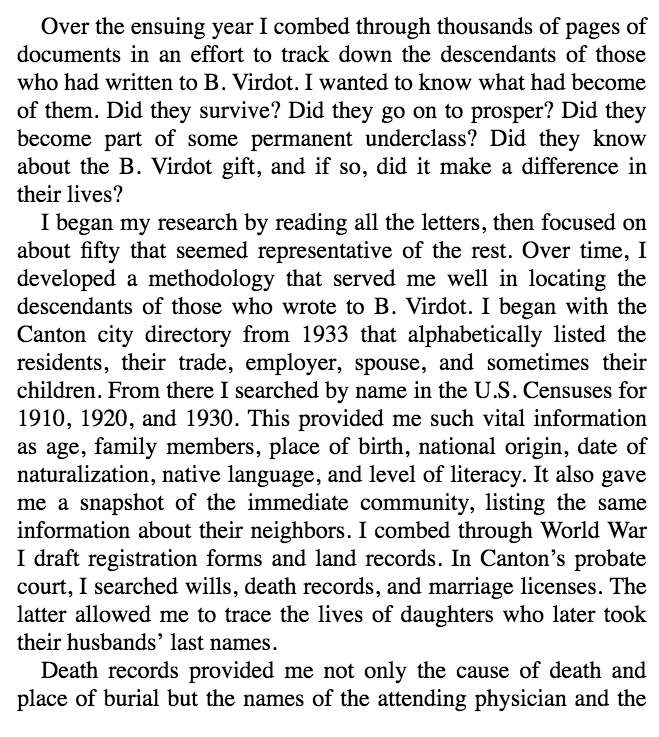
Now we often use mentor texts in education, and why not when we’re trying to teach research? In the extract below, Gup,  explains how he, a former Washington Post investigative journalist went about uncovering the story of his grandfather.

Research 1

Research 2
2 page extract from: “A secret gift” by T. Gup

This is the type of detail that is hidden to people who read a newspaper report. The amount of work is just staggering.

Perhaps that is why students struggle to understand what “real life” research looks like. After all what kind of research are they exposed to? Wikipedia is actually not bad, as it cites its sources at the bottom (to those who scorn it). Britannica for students hides behind editorship (as a substitute for identifiable authorship) and a lack of sources (this article on the depression has two authors but no sources and yet we’d rather students go to Brittanica than Wikipedia?). Books, when they’re used at all, do have sources, sometimes, depending on the target age and how scrupulous the publisher is. Newspaper or magazine articles – we have no idea of either the research process nor the sources of information except inasmuch it is divulged, for example, in movies such as Spotlight.

So our young researchers go off onto the internet, or maybe to Britannica and Brainpop and some books and then as they mature we coax students into using databases and journal articles. Where again, they see the end product rather than the process.

How often do we get researchers in to uncover their craft? Versus for example authors of fiction or poetry?  So is it by accident or design that they’re not breaking through those threshold concepts?

References:

Gup, T. (2014). A secret gift: how one man’s kindness–and a trove of letters–revealed the hidden history of the great depression. New York: Penguin Books. Retrieved from http://rbdigital.oneclickdigital.com


The Boston Globe. (2016). The Boston Globe Spotlight Team. Retrieved from https://www.youtube.com/watch?v=kJfyjq80Ths

If we build it will they come?

In my past “homeless” week I’ve had opportunity to offer PD to my fellow librarians & library staff and to some teachers, and also to go into classrooms for a longer period of time and help with research, and I’ve had time to find, curate and put resources onto our libguides, and I’m hot-desking in the coordinator’s office. Its’ been a very informative time.

What I’ve learnt:

  • Never make assumptions about a basic level of digital literacy – just because you’re comfortable with screenshots, copying and pasting, using short-cuts etc. your audience may not be. Often they only know the very specific applications and programs (and operating systems) that they need for their specific tasks in their job.  You need to be very explicit and slow in explaining things.
  • Many many students do not know the difference between being in a browser window and typing in a URL (even a shortened one) and typing in a search term in a search box since the two have become ubiquitous to them – and Chrome as a Google product has played into that by allowing you to access either a search or an address from either. That’s something I never paused to think about, as a computer child of the 80’s they were very distinct things. This is philosophically interesting and I wonder if it impacts on understanding the nature of search and query?  I see a considerable amount of blurring generally – and if one thinks of aspects of information literacy in terms of threshold concepts I’m wondering if all these developments, while apparently making things easier are actually making them more difficult?

My biggest learning is that I have a poor understanding of how, where, why and when students and teachers access information. I’ve gone for a (at least) three times redundancy concept in providing access to anything –

  • in the OLP (Online Learning Platfrom – both on the homeroom page AND on the library page)
  • on the front page of our OPAC
  • on our Library Guides

In initial library lessons we’ve also had students (and teachers and parents – in our library bytes sessions) bookmark the 3 primary sites – the catalog, the library guides and then library OLP page. But the issues with information seem to be more deep-seated than that. I suspect that there is still confusion about not even knowing why you’d want to access anything – a kind of informational existential issue.

I’m guessing about 10-15% of the students in a class are making full use of the resources we’re providing.  Our school is probably not unique in this. I hear the same lament everywhere.  There is the saying of “meet your customer where they are” (not where you want them to be) and I think we neither really always know where they are – or we suspect they’re just on google, nor are we able to meet them there. AND OUR VENDORS ARE NOT HELPING US!  Let’s take our OPAC / Catalog as an example. Follett has finally woken up to the fact that google, and not our catalog or databases is the first place students look, so they’ve come up with a very nifty chrome extension that allows you to plug in your catalog (and webpath express) as the first search result – like below

screen-shot-2016-12-10-at-10-42-09-am

But, it only works with iOS on desktops / laptops. And we’re an iPad school (not an android / chromebook school). So it doesn’t work on iPads. So far so useless actually.

Oh, but there is a Destiny Discover App for iPads… except all it does is try to update every time you access it, and it gets to 31% and then crashes. And you can only set age / Lexile / grade level limiters to books, not databases or online resources, so it’s even more overwhelming than good ole google.

So at our last inter-campus librarian meeting we decided to try and encourage entry and access to our paid resources by making them options on our UOI guide resources page – so we’ve semi-standardised our boxes to have Books (with a link to the catalog via Librarythingsforlibraries book display widget), Videos (since Youtube is the 2nd only to google as the “go to” place for student research) and Resources (including Britannica, Brainpop, Epic Books and other curated links).

screen-shot-2016-12-10-at-10-51-56-am

The thought is, that they then don’t have to leave the page in order to go to a resource, they just click on the picture, and get to say Britannica, and once they’re there, the threshold is lower to then search for something from within there … we’ll see what the reality is.  I’ve also explicitly told them this in their last research lesson. Now to follow up and see if the usage stats change.

So what now? 

I think I need to move to a simpler and more intuitive layout – Following Katie Day’s layout for her research guide, perhaps making it student question related?
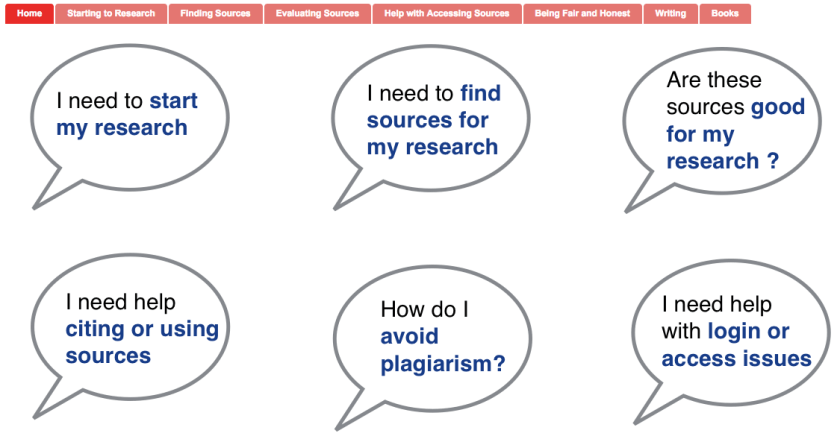
screen-shot-2016-12-10-at-11-08-41-am

At a whole different level is the services and guides that happen at Scotch College ….

screen-shot-2016-12-10-at-11-15-54-am

I think I need to sit down with teachers and students and really understand how they use information, how they look for it and where they expect to find it. Customer journey maps – something that I was thinking of as an alternative study avenue before I looked at our Blokes with Books club as my case study. Has anyone looked into that in the library context? I know people have looked at social media in library, but this is different – the physical and digital paths our patrons use to get information (or get frustrated by us). Any pointers?
 

Whose search history would you like to see?

FastCo had an interesting post yesterday about how you can download your browsing history on google (Twitter also lets you download your tweeting history) and how you could then see what marketeers and google knows about you.  I don’t think that’s nearly as interesting as the potential if you could see the browsing history of really interesting people. Or people who are making an impact on thought or research in a particular field…. read more

Whose history would you like to see?

FastCo had an interesting post yesterday about how you can download your browsing history on google (Twitter also lets you download your tweeting history) and how you could then see what marketeers and google knows about you.  I don’t think that’s nearly as interesting as the potential if you could see the browsing history of really interesting people. Or people who are making an impact on thought or research in a particular field.

I was reading “The Open Research Web” yesterday, and while reading it was thinking, wow this is wonderful combined with, but some of this is already happening with Google scholar (book is dated 2006, which is light-years ago in tech terms), but at the same time we could do more. And that more could be incorporating the searching of the experts.

I was just thinking of whose search history I’d like to be able to interrogate.  I like interrogating things like people’s bibliographies/references in their articles / books anyway, but by it’s very nature the references are only the stuff they used. What about the stuff they discarded but may be just the thing to complete your curiosity and research puzzle?

Right now at this moment I guess it would be people like Jane McGonigal, Stephen Downes (who kind of shares bits of what he curates after his searches and feeds), Carol Kuhlthau, David Weinberger, Esther Duflo, Jim Cummins just to name a few off the top of my head.  Next week it would be a different subset.

I’m not much into day-to-day politics, but wouldn’t it be fascinating for the historians of the future to have access to the search histories of the leaders of today?

It’s almost a pity all this information and raw data is just being sold to the highest bidder and grossed up and anonymised as it is personalised just for the sake of one-on-one grubby commercial marketing.  Sure, maybe google say the want to “do no evil” but what potential for good are they leaving on the table?

First questions

(a) define what social networking is (in your own words);
In my opinion there are two types of social networking – that which occurs online, and that which occurs online. In both my online and offline worlds I enjoy having disparate networks of friends and connections who define parts of who I am and how I function in the world.  These days, my online and offline social networks often intertwine.
A network is basically a group of people who are connected to you by virtue of something you have in common.  For example, I have a network of friends who I work out with at crossfit.  We see each other at workouts and at functions organised by the box, but we’re also active through Facebook where we post articles and comments and questions to each other.
On the other hand, I’m a member of LinkedIn, where I’m connected to people who I’ve worked with or come into contact with professionally – a few of them are personal friends, and some are Facebook friends, but most are not.
For many years I wrote a blog on bilingual chinese / english education.  I wrote this anonymously and over the years built up quite a following of anonymous strangers, some of whom became friends – we were united in a social network but most of us never met.
The best social networks are the ones that give you a buzz, where you’re interacting, enjoying and learning and contributing all at the same time.  Funnily enough for me that usually works when I’m one on one with someone and we’re “jamming” – not in the musical sense but in the app sense, and it’s a case of “look what cool toy I found” and seeing how we can apply it to solve real world personal or professional problems (like today).  Or when you’re trying to plan thing and you or someone knows someone who then knows someone else who would be perfect for a talk or presentation or bit of information that will complete what you’re trying to achieve.
In order to have a good social network you need to be able to both “get out there” physically and network in real life, and “be out there” hanging out where your professional peers are hanging out – whether that’s blogging, twitter, Facebook, LinkedIn or whatever else the flavour of the month is.  – And if your kids aren’t doing it – it’s probably not worth spending much time on.
 In the context of this course, social networking is probably referring to the networking that happens online.  
(b) list what social networking technologies and sites you already use (for personal, work and
study purposes); and
LInkedIn, Facebook, Twitter, Diigo, Blogger, Flipboard, Youtube, Evernote, Goodreads, Whatsapp, Picassa, Google+, 


(c) describe what you expect to learn from completing INF506
Keep current, maximise and optimise my time online.  Coherence between the various platforms.