If we build it will they come?

In my past “homeless” week I’ve had opportunity to offer PD to my fellow librarians & library staff and to some teachers, and also to go into classrooms for a longer period of time and help with research, and I’ve had time to find, curate and put resources onto our libguides, and I’m hot-desking in the coordinator’s office. Its’ been a very informative time.

What I’ve learnt:

  • Never make assumptions about a basic level of digital literacy – just because you’re comfortable with screenshots, copying and pasting, using short-cuts etc. your audience may not be. Often they only know the very specific applications and programs (and operating systems) that they need for their specific tasks in their job.  You need to be very explicit and slow in explaining things.
  • Many many students do not know the difference between being in a browser window and typing in a URL (even a shortened one) and typing in a search term in a search box since the two have become ubiquitous to them – and Chrome as a Google product has played into that by allowing you to access either a search or an address from either. That’s something I never paused to think about, as a computer child of the 80’s they were very distinct things. This is philosophically interesting and I wonder if it impacts on understanding the nature of search and query?  I see a considerable amount of blurring generally – and if one thinks of aspects of information literacy in terms of threshold concepts I’m wondering if all these developments, while apparently making things easier are actually making them more difficult?

My biggest learning is that I have a poor understanding of how, where, why and when students and teachers access information. I’ve gone for a (at least) three times redundancy concept in providing access to anything –

  • in the OLP (Online Learning Platfrom – both on the homeroom page AND on the library page)
  • on the front page of our OPAC
  • on our Library Guides

In initial library lessons we’ve also had students (and teachers and parents – in our library bytes sessions) bookmark the 3 primary sites – the catalog, the library guides and then library OLP page. But the issues with information seem to be more deep-seated than that. I suspect that there is still confusion about not even knowing why you’d want to access anything – a kind of informational existential issue.

I’m guessing about 10-15% of the students in a class are making full use of the resources we’re providing.  Our school is probably not unique in this. I hear the same lament everywhere.  There is the saying of “meet your customer where they are” (not where you want them to be) and I think we neither really always know where they are – or we suspect they’re just on google, nor are we able to meet them there. AND OUR VENDORS ARE NOT HELPING US!  Let’s take our OPAC / Catalog as an example. Follett has finally woken up to the fact that google, and not our catalog or databases is the first place students look, so they’ve come up with a very nifty chrome extension that allows you to plug in your catalog (and webpath express) as the first search result – like below

screen-shot-2016-12-10-at-10-42-09-am

But, it only works with iOS on desktops / laptops. And we’re an iPad school (not an android / chromebook school). So it doesn’t work on iPads. So far so useless actually.

Oh, but there is a Destiny Discover App for iPads… except all it does is try to update every time you access it, and it gets to 31% and then crashes. And you can only set age / Lexile / grade level limiters to books, not databases or online resources, so it’s even more overwhelming than good ole google.

So at our last inter-campus librarian meeting we decided to try and encourage entry and access to our paid resources by making them options on our UOI guide resources page – so we’ve semi-standardised our boxes to have Books (with a link to the catalog via Librarythingsforlibraries book display widget), Videos (since Youtube is the 2nd only to google as the “go to” place for student research) and Resources (including Britannica, Brainpop, Epic Books and other curated links).

screen-shot-2016-12-10-at-10-51-56-am

The thought is, that they then don’t have to leave the page in order to go to a resource, they just click on the picture, and get to say Britannica, and once they’re there, the threshold is lower to then search for something from within there … we’ll see what the reality is.  I’ve also explicitly told them this in their last research lesson. Now to follow up and see if the usage stats change.

So what now? 

I think I need to move to a simpler and more intuitive layout – Following Katie Day’s layout for her research guide, perhaps making it student question related?
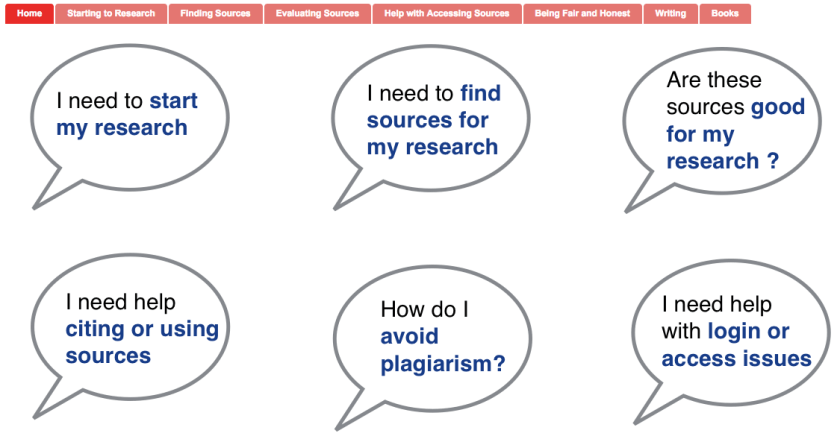
screen-shot-2016-12-10-at-11-08-41-am

At a whole different level is the services and guides that happen at Scotch College ….

screen-shot-2016-12-10-at-11-15-54-am

I think I need to sit down with teachers and students and really understand how they use information, how they look for it and where they expect to find it. Customer journey maps – something that I was thinking of as an alternative study avenue before I looked at our Blokes with Books club as my case study. Has anyone looked into that in the library context? I know people have looked at social media in library, but this is different – the physical and digital paths our patrons use to get information (or get frustrated by us). Any pointers?


Make-over update

When I tell people we’re getting to renovate and extend our library their first reaction is “wow, that’s amazing, you’re so lucky!”. And yes, prima facie it is so. But right now it’s feeling rather overwhelming. And ironically most of that is not so much to do with the change as the amount of preparation that needs to be done. Speaking of change – you HAVE to get “Bug in a Vacuum”

I am a veteran of moving. 10 countries in 24 years plus countless internal moves in those countries and 3 moves in the last 5 years. I know it pays to be prepared and to clean and clear before the move. And as I remarked in my last post, a lot of that cleaning and clearing happens behind the scene.  Things are slightly more complicated as well due to well, life. Unforeseen circumstances. Like one staff member on maternity and another on hospitalisation leave. And part of my gratitude thoughts each day are for my remaining staff member who is picking up a lot of the slack and the temporary staff member who is happy to learn the ropes and keep things ticking over. And the other temp who has been coming in and the occasional parent or volunteer for their kindness.  But it does slow things down as we adapt and learn.

So, significant but time consuming things that have been done this week – including taking up time in my weekends – those weekends that I thought would be computer and work free now that I’ve finished my M.Ed!

  • Putting patron photos into FollettDestiny  – easy in theory but quite a lot of preparation work – including learning all sorts of new Excel tricks on how to add things before and after text in cells!  And of course 90% goes well, but the 10% that bombs out, takes 90% of your time to trace why an upload didn’t work, what went wrong and how to remedy it.
  • Cleaning up patron data.  After the last patron update I found about nine pages of patron data that just wasn’t right. Parents marked as students or staff, students who had left years ago, staff who had left, incorrect emails etc.  Now bear in mind, when I prepare these lists, I then go into school with a full teaching schedule and it literally took 2 people 2 days to clear it all up in-between their regular tasks of circulation, shelving and THE PREP
  • Yes, the PREP. we have 9 different grades from Pre-Kindergarten to Grade 6, and each of those have 4 (Kindergarten) -6 (the rest) UOIs. The library has to be vacated by next Friday. Most UOI’s are changing over on Monday coming. Many UOIs have changed this year. So that means checking the central idea etc. checking previous year’s lists, quickly checking with the lead that my understanding of where the topic /theme / concept is going is the same as theirs, making new lists and then packing up 18 boxes of books and DVDs – 9 for the coming week when we’ll have over 1000 books returned from the last units and 9 for the first weeks of January 2017 – just in case. Because of course our handover of an empty library to the designers / constructors is 1 December and of course their hand-back to us is 1 January. But I am of little faith that things are flawless. So I err on the side of caution.  And bear in mind, we’re still having our 35 classes a week, plus all sorts of meetings that are using the library so we’re configuring and reconfiguring the space and arranging catchup classes…
  • The new books. And the wrongly processed books. I still hold vestiges of anger on our last big book order with Follett that went horribly wrong in every which way it could have gone wrong. They didn’t deliver on time or as arranged, they catalogued incorrectly, spine labels were wrong etc. So we’re still sorting out that mess. And then I put in a couple of other smaller orders, but our cataloguer is off on hospitalisation leave so we’re cataloging on the fly.  Now this is a GOOD thing I keep on telling myself. I’m all for final responsibility for tasks and work flow, but I’m also all for everyone pitching in and helping and knowing all aspects of the process. It’s been a little peeve of mine in the library world that there is so much segregation of duties and these past weeks have just proven that given the chance people can do way more than they or anyone else may have thought. But it is extra work – did I mention what else was going on?
  • The weeding. Saying goodbye is so hard to do!  I must admit having absolutely no problems ditching the disney fairy series that no-one was looking at or borrowing. But then there are other books – Michael Rosen’s “Sad”. I’m sad that no-one seems to have ever borrowed that. And I feel bad that I’ve not marketed it, or allowed it to see the light of day and be nurtured and treasured. Perhaps if I pair it with Bug in a Vacuum?  Weeding is sweet sorrow. It highlights our failings as book pushers. I feel like a neglectful parent when a book that’s been bought doesn’t get the attention it needs. I spend time with each of them and ponder whether putting them on a resource list would help. (No jokes about “will this bring me or someone else joy) Or perhaps asking students and teachers to ponder their fate. And I do both, and some survive for another day.
  • Acquisition plan – my kids ask me “if we’re getting a new library does that mean we’re getting new books?” This is the double edged sword of money and budget. I was talking to some fellow librarians last week – their budgets are double mine. Sometimes less is more. Our students and our teachers probably only have capacity for perhaps one really good reading book a week. Each. What should that book be? And for research / nonfiction? It’s so hard. I try so hard, but this week it has been stingrays and grasshoppers. Boats and jet planes. Last week it was fast cars and how to make your own vegetable garden (try getting one of those for an equatorial climate, suitable for G2 level), dinosaurs are totally out of favour. They want tornados and not hurricanes.  And “Miss where are your Indian books?”  and “there’s nothing on Bangladesh” I’m trying to diversify. They deserve Indian books, and overseas Chinese but not ABC (American born Chinese) books, and Korean protagonists and Japanese heroes. The triplet sister of acquisition and weeding is discoverability. I need to crack that nut in the new library. Does that mean genrefying, through label or location? Does it mean more work on resource lists or libguides or other pathfinders?

The problem with grappling with all these things is that they take up a lot of brainspace and thought space and discussion space. All of which is being take up by doing. I’m looking forward to the library being boxed up and having time to be more strategic, having time to go into classrooms and observe and understand.


Day 4: Technology in the library – how has it affected your role

I’d say that it’s thanks to technology that I have a role in the library.  Just before doing my work placement I got involved with creating a pathfinder for my course in information services, which was quite well received.  On the back of that, during my work placement I had the wonderful task of creating lots more pathfinders – all using Libguides.

Here are a few of them:
Psychology
Music
Mathematics
Science
Economics
Drama & Theatre

One of the wonderful things about technology in the library is that it means that we can curate information for all types of learners in all types of formats, catering to the way students best absorb information and learn.

Today I saw a really cool infographic on videos, personally I HATE getting information via video, but it’s the best way for my son to learn.   And – newly learnt from that infographic – youtube has become the second biggest search engine on the internet after google …

The good thing about a pathfinder like libguides is that I can incorporate videos and pictures and podcasts and links to books.  I can make it very visual.  I can make it current with links to RSS feeds from the news, and design-like with my click-through to the various flipboards we’ve made for each subject.

Not every librarian has the time or inclination to make libguides, or likes making them, or enjoys sniffing around the internet for just the right video or picture or podcast or blog, but I love doing that.  I’ve got all sorts of ideas for pathfinders for lots of different things, not just academic subjects – like one for parents of special learning needs kids – everyone needs resources and it’s so much easier if you have a starting point, not just the whole wide web shooting it out at you.