Day 3: Website I can’t live without

That’s a hard question, as there is no particular website I can’t live without – i.e. most have substitutes in one form or another.  However I don’t think I could live without the web.  Possibly google search along with google scholar and google images are the sites I use ALL the time.  I’ve book-marked duckduckgo after reading an article about the lack of privacy that google affords, but must admit to having only used it once or twice since bookmarking it ….  habits die hard. And now I’m trying to find the article, and discover I didn’t diigo it – diigo is slowly becoming a habit, but not as quickly as it needs to.

So here are a few of the articles I’ve just googled about duckduckgo (haha, isn’t that ironical!)
PCWorld – who explain how it works and why it takes longer
SearchEngineland – who rightly point out that people probably don’t care much about privacy
and EtherRag – who discriminate between privacy from advertisers and from the NSA.

On the other hand there are websites that I think that I’m overly active on – like Facebook that I could be a lot more discriminate about – I like the newsfeeds from all my friends and ex-collegues and ex- & current classmates around the world.  But as a (future) librarian I HATE the non-searchability and non-curateability of it all (if those are words, which my online spelling check says they aren’t – but a spelling check is one of those love to hate tools, especially when writing in multiple languages).

Back to google – I think lack of privacy may the price we pay for “free” search.  And since enough of us are making that trade-off – consciously or unconsciously, it’s got a big enough platform for it to work. And that’s the alpha and omega of it all.  And since we don’t live in north Korea, and do have capitalism and do have the internet, someone’s going to make a buck off it.  C’est la vie, says the cynic in me.

Day 2: ebooks & audiobooks

This is a tough one.  The library I’m with at school hasn’t jumped on board.  And all for very good reasons.  Personally though, in my home library I’ve been embracing audio books ever since my kids were very small – (about 10 years ago) when we were living in Spain and I had a long commute to take them to and from kindergarten every day.  We started off with Peter Pan, and we’ve never stopped since then.  Even now when we drive from Netherlands to Switzerland in the summer – a good 8 hour trip we’ll arrive at the destination and they’ll clamour to stay in the car until the chapter is over.  It’s always been Naxos audio-books, as they have such wonderful voice artists, and we must have the CD of just about everything they’ve ever published (and if I ever have to listen to Professor Branestawn which has been on repeat mode for about 1 million time … again ….).  I also listen to the adult ones, and “A history of the world in 10 1/2 chapters” must be one of my all time favourites – it almost demands to be read aloud.   We had a subscription to the Naxos spoken word library – and that was wonderful – the kids used to dip in and out of books every evening before going to bed – particularly the children’s poetry – again something that is wonderful to hear rather than to read.

eBooks – I was an early kindle adopter, and I’m slowly but surely replacing all my old mouldy and yellowing classics with the online versions.  I love it for holiday.  I also have “overdrive” on my ipad, where I borrow books non-stop from the NLB, particularly when I’m travelling.  They also have audio-books for kids and my kids had great fun listening to the “Just William” books.

As a consumer therefore, yes, but as a librarian I know there are all sorts of issues with rights and ownership, not even to mention needing to train staff to train clients on the use thereof.  So that concludes day 2 of the challenge.

And if anyone knows how to get Gutenberg books into your Follett Destiny Catalogue – I’m all ears!

Day 1: Tech tip

The first on the challenge was to share a Tech tip.  Mine would be incorporating a library with a federated search into your google scholar through library links.

This was a tip shared by the NLB while I was on the study tour last year.

Here is a step by step guide:

1. Go to google scholar


2. On settings choose “library links”


3. In “library links” you add the library (up to five) where you have access to a journal database. In this case you can see I’ve added Charles Sturt University where I’m a student.

4. When you do a search, on the RHS you will see links to your library where you can directly (after putting in your password and ID) go to the article via your libraries database.

Challenge …

Going to try and rise to the occasion and blog every day for 20 days (may be easier than any fitness or diet resolutions …) following the lead of “Where Books and Technology meet” where Jennifer Brower has set out a nice little scheme to follow.  So here goes …

Social Media Frenzy (1)

I’m busy looking into various social media tools for International School Librarians for my next assignment.  And at the same time, I’m trying to resolve for myself what works and what doesn’t to manage my own ever-increasing flow of information.  Over the next few posts I’ll introduce each new tools I’ve found and give a link to what I’ve done with it.

I’ll start with what I consider to be the most successful result – using paper.li to curate information flow from Twitter.  Now I must admit, that prior to doing my research I was pretty agnostic about Twitter.  I didn’t really “get” it.  I didn’t want a constant flow of information and my weekly updates were exhausting to look through, even if it was only 140 characters a post.  And, I think Brain Pickings tweets too much so I had a ton of stuff from them.

Then, I saw, according to the social savvy librarians in my survey, that Twitter was the highest ranked social media for professional use, and in the explanations, I was led to the hashtag #TLChat.  But then when I went to Twitter, I couldn’t find a way to follow #TLChat.  So, Joyce Valenza to the rescue, as always.  She had a blogpost on how to feed twitter tags into a curated newspaper using paper.li – it’s already 2 years old, but it still works perfectly – just goes to show how badly I didn’t get Twitter.

Anyway, it works a treat, and here is the newspaper I made combining the hashtags for #TLChat, #EdChat and some other bits and pieces.  Now I need to make it all mobile and download onto my ipad.

Livin’ and learnin’


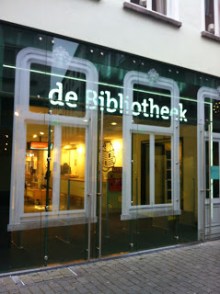
A Dutch Village libary

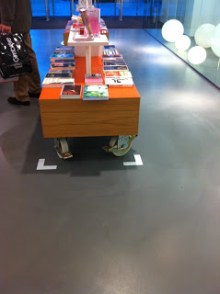
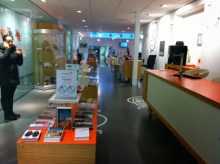
Here are some pictures from the local village library in Bergen op Zoom where we are staying for the Christmas vacation.  The library fits into the street scene and yet it has a very modern facade – which in fact created quite a controversy between the local government and the conservation movement in town. From the outside it looks more like a modern office or shop than a library.   On entering you immediately see that the shelving has been placed on large industrial wheels which creates a multi-purpose space.

Further along, in the next space, the books are on more traditional shelving, however the fiction section has been sorted by genre as well as having a part still by alphabet.  There are large icons on the walls, which are echoed later in the shelving to show where magazines, DVD’s, Books, CDs etc are located.

Library 2.0

ACTIVITY
View this YouTube video called ‘Building Academic Library 2.0’. This is part of a symposium sponsored by Librarians Association of the University of California, Berkeley Division in 2007. While this presentation is over one (1) hour in duration, there are a number of key points raised by a number of speakers, including the keynote speaker Meredith Farkas, that relate to any library or information agency that is trying to transform their library into a 2.0 Library.
Consider advice provided by one or more of the speakers in terms of a library and information agency that you know (as an employee or user). Select five (5) key pieces of advice from these speakers, and consider how these may be applied to your library to help it embrace a Library 2.0 ethos. Write up your findings as a post (of no more than 350 words in your OLJ).
 

Although the library I am working in can be considered to have embraced Library 2.0 in all of its aspects, that doesn’t mean that there isn’t a possibility for improvement.  After listening to the talk, the following 5 points struck a chord with me.

1.  Use of microblogging to communicate within areas of the library – since our campus has two libraries and the college has a sister college who we co-operate closely with, also with two libraries setting up some kind of professional micro-blogging knowledge exchange would have potential benefit.  
2.  The fact that current students often turn to their parents as their first port of call.  I think we could be much more proactive in involving parents in understanding how the library can help the academic success of their children.  A few sessions aimed at parents explaining how libguides work, how the catalogue works and how to search academic articles through our journal databases and a bit on citation and social/academic bookmarking would be very helpful and possibly lead to a higher take-up.
3.  “Go where the user is” – we have started greater co-operation with subject teachers through creating LibGuides with help of their input. It would be useful to also have subject specific Diigo accounts where students, teachers and the library can all tag useful links to articles and information.
4. How do we classify? We have already separated out parts of the collection, such as playscripts, biographies, graphic books, poetry.  We are also creating special areas for the IB subjects where we keep multiple copies of “hot reads” where books are no longer purely in the Dewey System. I can only think this process will continue, perhaps to the fiction area where genres are separated out.
5. Time taken to implement.  A number of times the talk mentioned that take-up time for any technology could be in the region of 18 months.  I think we have a bit of a mentality that “build it and they will come” and perhaps we need to spend even more time on user education and encouragement to use the wonderful tools we have created.

Here is a link to a summary of the talk.

References:

Farkas, M. (2007). Building Academic Library 2.0 [YouTube]. Retrieved January 30, 2014, from http://www.youtube.com/watch?v=q_uOKFhoznI
University of California Berkeley Library. (2007). Academic Libraries 2.0 Keynote – Meredith Farkas [Blog]. Retrieved January 30, 2014, from http://blogs.lib.berkeley.edu/newdirections.php/academic_libraries_2_0_keynote_meredith_


RSS

Activity
Now that you have explored some examples of how libraries and the media make use of RSS to deliver updated information and the applications that can tailor and aggregate feeds for specific users, find two (2) additional examples of ‘RSS in action’, and develop a 350 word post to your OLJ on how RSS can enhance a library or information service’s ability to meet the information needs of its users.


In the library I currently work in we have a number of uses for the RSS feeds.  Particularly these are used to link the “physical” world to the “virtual” world.  

In the first instance, we have created a number of LibGuides for the International Baccalaureate students who are about to commence research for their Extended Essays.  Each guide has a number of sections, including books, journals, online resources etc.  The books section, makes reference to our physical shelf collection.  Then on our shelves we have created subject specific areas, clearly demarcated with shelf-signage, and on the signage is a QR code which leads back to the LibGuide of that specific subject. Here is a picture of the Development Economics section which leads back to the Development Economics LibGuide.


The second area where QR codes are used is to lead students from either a poster or a place-holder on the library shelf back to the library catalogue.  The picture shown is a large (i.e. 1m x 2m) poster which shows some books recommended for Grade 6 reading. The poster may be in the library or in the classroom or the grade corridor.  The QR codes will take the student back to the library catalogue where they can see whether the book is on-hand or out and make a reservation if necessary.  The books on the poster are also place in a separate shelf in the library, where the behind the multiple copies, the same picture and QR code appears, so if the books are all check-out, students can place a hold.

There are other uses as well, for example we have posters of books which have been turned into movies, and the QR code with a picture of the movie poster, will lead to the movie trailer on the one hand, and on the picture of the book to the library catalogue on the other.

Dewey didn’t do Geography

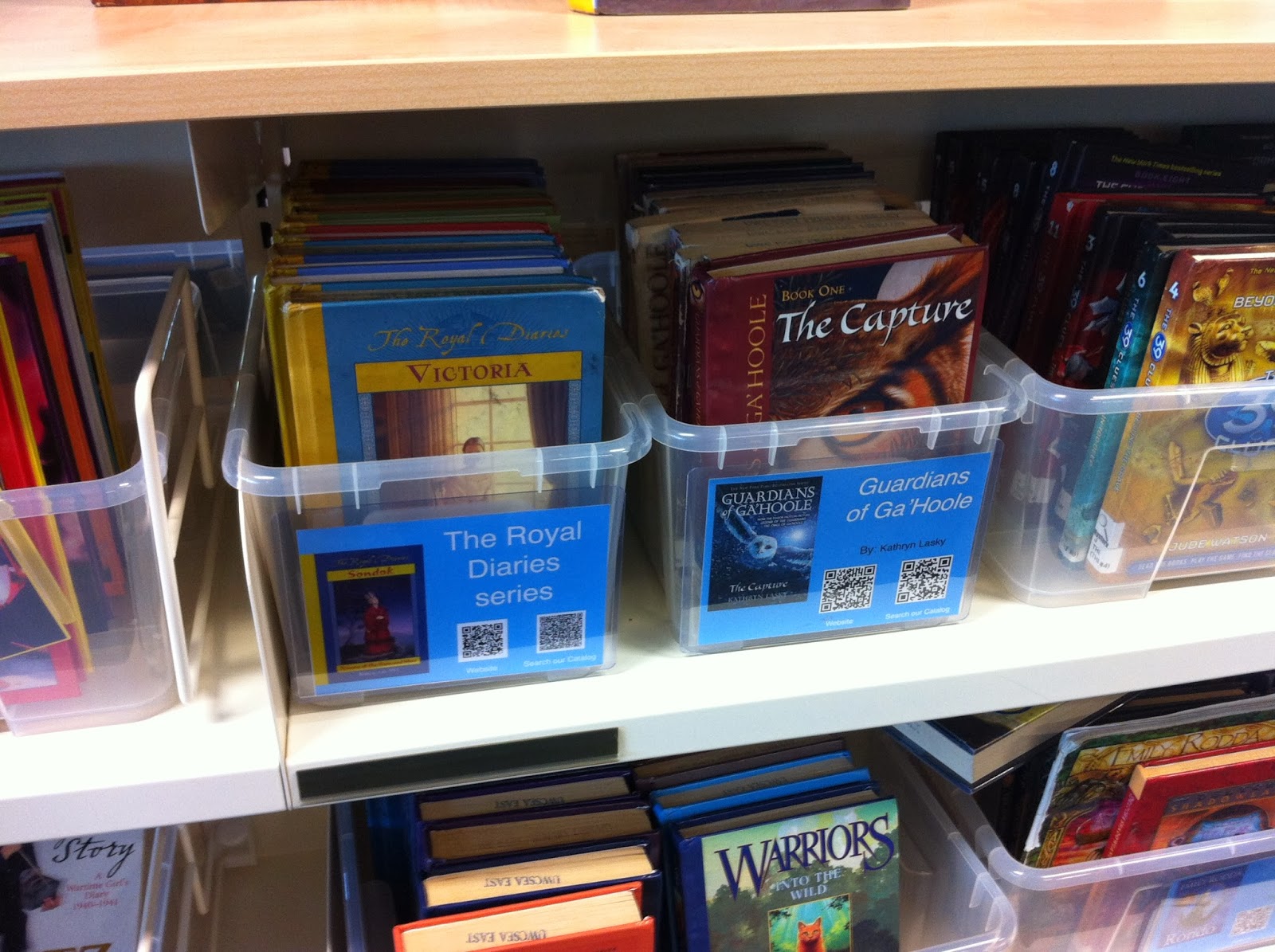
Series

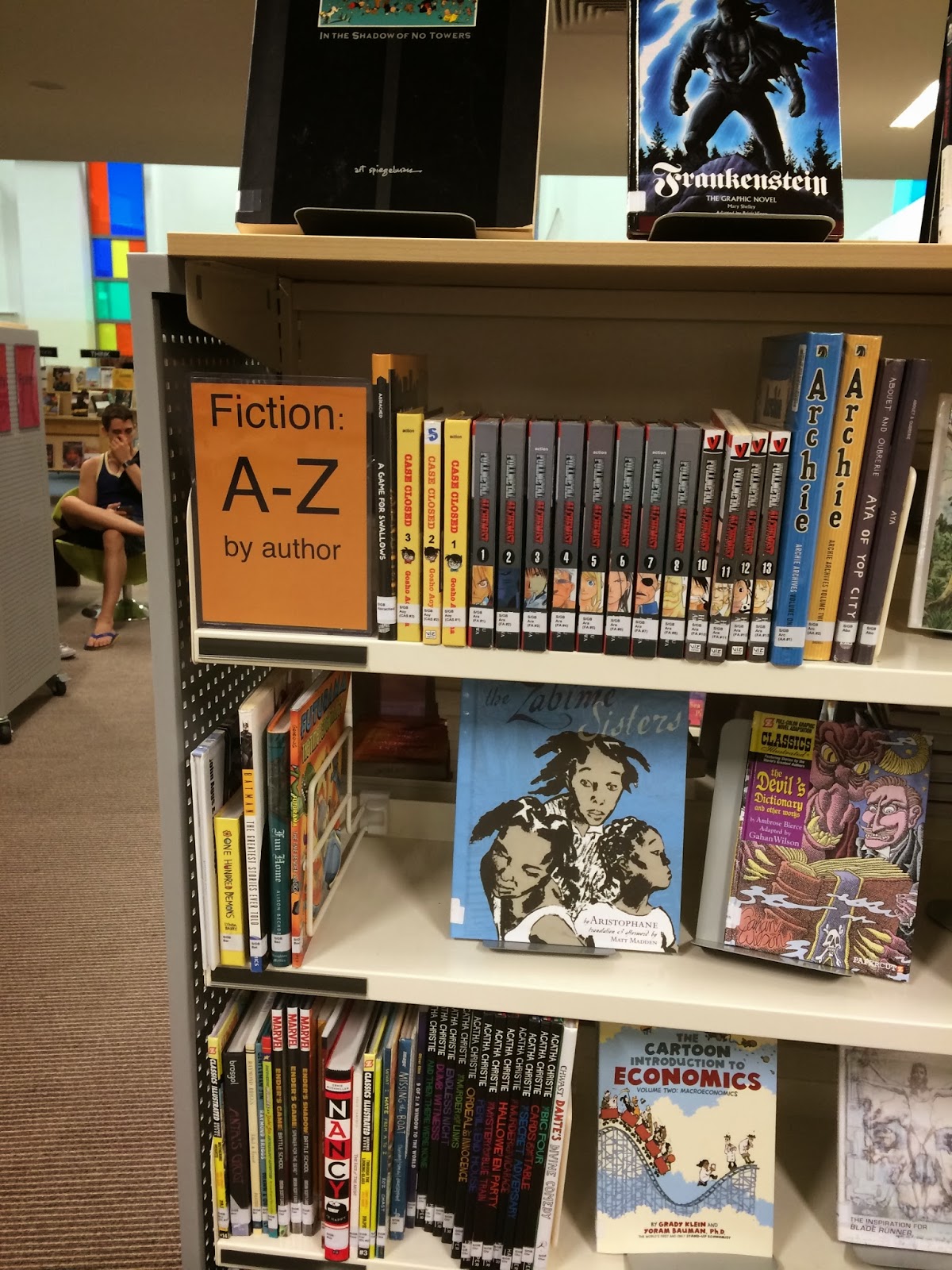
There’s been quite a bit of chatter about the “de-dewification” of the library, if that’s the way to write it. Of course that all started way back, when people pulled their fiction out of the 800’s and sorted it by author, but the trickle seems to be turning into a flow.

Graphic book Section

While I was on the Singapore Study Visit, Ngee Ann Poly was one of the many libraries who have moved towards a bookstore concept for their lifestyle books.  Library Grits wrote about the topic this week, referring to the AASL13. Where I work, in Secondary, we’ve pulled out Biography, Playscripts, Graphic Books, and Poetry.   In primary, we’ve got boxes for series and have pulled out Graphic Books.When I did my Libguide for Development Economics, and we wanted to link the physical to the virtual, we were pulling books out of various sub-classifications and putting them together (in DDC order in the Economics section, but not in Economics order – if that makes sense!).  That was reasonably manageable and not to way out.

The Princess Book Section

But then last week I started work on the Geography Libguide.  Boy o boy, Dewey didn’t do Geography.  Or at least not in any form that a modern geographer or geography student would recognise it these days.  A complete aside, but Ms. Katie was then telling me why Geography is not such a big deal at American universities as it could be, or is in the rest of the world.  So, what did Dewey allow us?

910 Geography & travel 
911 Historical geography
912 Graphic representations of earth, atlases
913 Ancient world
914 Europe 
915 Asia 
916 Africa
917 North America 
918 South America
919 Other areas

And what do we need?  – This is a little topic list from our school’s IB syllabus:


People on the move: Migration
Global Climate change: causes and consequences
Demography
Resource consumption and the environment: Making a difference
The big Blue: Ocean morphology and Climate Connections
Where land meets sea: coast
Resources and marine ecosystems
Urban Environments
The Melaka fieldtrip unit
IBiodiversity and tropical ecosystems
Soil resource management
Water on tap: water resource management
Development Disparities: Measuring the differences, disparities within communities and responses
Life on the edge: Hazard perception and vulnerability
Global Interactions: Globalization

So it looks like we’re going to have to work with a separate shelf plus some kind of sticker identification on the spine of the books.

Anyone else there struggling with Geography?

Use of social bookmarking


I’m fairly new to social bookmarking, having only commenced using it during my Student Placement for my degree.  I’m currently using it at it’s most primitive form, i.e just as a cloud based bookmark bar, although I have used the sharing function with the librarian.

I think my use is similar to that of most people’s use of most technology.  They use it as a “quick and dirty” tool and seldom use all the functionality.  This assignment has prompted me to thinking of it in a broader sense and to exploit it more widely, particularly as I start working as a reference librarian.  I need to exploit the “social” part not just the “bookmarking” part. 

Originally our school used Delicious, but moved to Diigo as a result of the fact that it provided the following additional features that Delicious didn’t

What can you do with Diigo that you cannot with Delicious?

Bookmark

  • – save bookmarks as private by default (optional)
  • – organize your bookmarks as a list and shown as a slide
  • – set up groups to pool resources and curate content
  • – automatically bookmark your twitter favorites
  • – keep a full-text copy of your bookmarks (Premium features)
  • – full-text search of your bookmarks (Premium features)
  • – save notes and images, in addition to bookmarks

Annotation

  • – use highlights and sticky notes as you read – do not just bookmark
  • – capture a portion of the screen and annotate on the screenshot” (Diigo, 2013)


At present we are busy preparing the Grade 11 IB students to write their extended essay.  Diigo is a useful tool to teach them and to use while conducting reference interviews for their specific essay, and also to create an area where information on common problems such as citation, accessing databases and referencing can be accumulated.  


Further to this, Library Grit has written a very nice piece on Diigo which you can access here.

=============
References:

Delasalle, J. (2013, February 22). Bookmarking websites: switching from Delicious to Diigo [Blog]. Library Research Support. Retrieved November 28, 2013, from http://blogs.warwick.ac.uk/libresearch/entry/bookmarking_websites_switching/
Diigo V5.0: Collect, Highlight and Remember! [YouTube]. (2010, July 21). Retrieved November 28, 2013, from http://www.youtube.com/watch?v=VHWapAF1Txw
Garmoe, P. (2010, December 17). 17 Reasons Delicious.com Users Should Head to Diigo [Blog]. For Bloggers By Bloggers. Retrieved November 28, 2013, from http://bestbloggingtipsonline.com/17-reasons-delicious-diigo/
McKenzie, D. (2014, January 4). Day 1 – Diigo [Blog]. Library Grits. Retrieved January 12, 2014, from http://librarygrits.blogspot.sg/2014/01/day-1-diigo.html?utm_source=feedburner&utm_medium=email&utm_campaign=Feed:+blogspot/zLvwr+(Library+Grits)
Transition from Delicious to Diigo ~ Instruction & FAQ. (n.d.). Retrieved November 28, 2013, from https://www.diigo.com/transition-from-delicious-to-diigo-faq