Online learning is not new shiny things

I’ll be the first to admit I’m an old boring Cassandra. It possibly / probably has to do with my age. Just to put things into context. Once upon a quarter century plus ago I was an auditor finishing up my articles. It was in the days when “calling” existed. Not the kind of cold-calling or call-centre type of calling, but when every single document that left the accounting firm’s doors would be read by one accountant to another (not secretarial staff, the actual articled clerks with three or four years university behind them) and checked to ensure there were no typos or spelling or number mistakes. This was the 1980’s just at the cusp of personal computers. It was tedious but important work, because the reputation of the firm and profession was at stake – or so we were told.
messengersA podcast episode that made a particularly profound impact on me was Freakanomics’ “In Praise of Maintenance” . Another favourite is Hidden Brain’s The Cassandra Curse which is particularly pertinent at the moment – with the fudging of Corona Virus numbers by a person who shall not be named in a country that should know better. A great book to read on Messengers and Messages is “Messengers” by Stephen Martin – valuable lessons on who gets listened to and why – spoiler – middle aged women are generally not listened to.

What does this have to do with online learning due to school closure in the time of Corona? That doesn’t quite trip off the tongue like “Love in the Time of cholera“… Well basically people are spending a lot of time exchanging tips on what tools to acquire and how to use them. All the tech giants and wanna-be’s are out there touting their wares and offering freebies (but what happens when everyone invests time and effort into content in them and we go back to having to pay???). Twitter and Facebook are awash with what tools to use for communication, teaching, feedback and learning. Padlets and Wakelets abound – that will all be redundant or fall into disuse or no longer be updated before you can blink your eye – because maintenance is well, boring. About one in 100 things I read are about sensible boring matters like setting up procedures, making sure systems are secure, robust and accurate.

And yet probably 99% of my time is spent documenting, testing, and fixing things that go wrong as people rush from the one new shiny thing to the other. It’s the boring maintenance stuff I’d recommend you spend some time on –

  • is all student data up to date in your student information system – we’ve had some poor souls join school during closure!
  • Are all students in the right classes / groups for every tool you’re using?
  • Is there a central entry point that students/parents can find information and get the daily/weekly learning and ask questions / get answers and where attendance can be taken?
  • Is there a place where information and knowledge management / FAQs can be accumulated for Teachers and Students (ours are in libguides)?
  • Are expectations for Teachers and Students clear, unambiguous and enforced (if necessary)?
  • Are there central calendars, preferably by grade where students and parents can check for online classes and meetings and assignment/assessment dates?
  • Are the lines of communication for Edtech / IT support / curriculum support etc. clear and easily found and used.
  • Are we working hard or are we working smart? Witness the overwhelming inboxes of some teachers who don’t make use of central forums for Q&A but still answer individual “same same” questions time after time.

A very valuable (but time consuming) exercise is to pick one student per grade and follow their “expected” path online checking from morning check-in, class to class, tool by tool and including the calendar to see that everything works as expected.

To parody the old saying of “an heir and a spare” – for each teaching and learning outcome you probably only need a pair of tools. One that is your trusty old steed that you preferably already were using before closure and everyone is familiar with (I nearly said “happy” there, but I deleted it, because hardly anyone is ever happy with the familiar old steed, they want the “next thing”) and you can use for 95% of things and the other is the one you have as a back up for when things collapse for one reason or another .

OREO online learning I still like Alison Yang’s graphic that came out waaaay at the start of the closures – about a million years ago (actually only five weeks but it feels much longer). Since not all the tools she recommended were “China Friendly) I used it (with permission) as the basis for the summary of the tools we’re using – each link in the guide leads to a page of explanations and usage tips and recommendations.

There comes a time in online-learning when as a community you have to agree to say “no” more often than “yes” because there is only so much a community can absorb, process and use effectively. You also need to be able to focus on just one thing each week on the back-end and do it properly.

This week was my “week of the calendar”. One could possibly not think of anything more boring and less “sexy”. But I was floundering under the 100s of zoom and team meetings that were popping up everywhere, some clashing with each other, many invisible or rendered invisible by poor naming strategies. I think I’ll change this into a separate post to minimise a TW/DR problem in blogs.

Have a great week – and don’t forget the plumbing.

Addition: 18 March 2020 – this is getting a lot of attention so I thought I’d add the infographic I made yesterday – happy to improve it based on suggestions (please add as a comment in the comments)

EdTech this and this


Photo by Sharon McCutcheon on Unsplash

Panda Madness

As we move into Week 5 of online learning I had a yearning to return to my librarian roots. I was prompted by our librarian network sending out a notice for the voting for the annual Panda Book Awards. Despite the closures the voting will continue. In my previous incarnation as a PYP librarian in Singapore I found it a lot easier to promote the Red Dot Book awards – you have a weekly captured audience in primary, plus we had our after school reading club geared towards preparing for the annual Readers’ Cup.

Things change in Middle School – puberty seems to affect the reading muscle as much as it does every other aspect of being. Also in China we have the “Kids Read” competition for middle schoolers, which is considerably more daunting – 100 books in teams of four.

Another aspect of online learning is that it is really hard for everyone to stay motivated. Our daily entry point each day is the Mentor discussion forum on Moodle. As much as Moodle is extremely robust, it’s also very old fashioned and clunky, so driving traffic there is a chore.

I’d been seeing a lot on my twitter feed on US librarians setting up for “March Madness” and that inspired me to get a “Panda Madness” going for March. Besides the voting I also wanted to put in some challenges for points with a couple of aims:

  • getting students onto our online reading platform Sora
  • getting students reading online generally
  • getting students reading the Panda Books
  • getting students to promote books through FlipGrid and book reviews on Oliver
  • making the daily sign-in to their mentor groups a bit more motivating and of course
  • having some fun

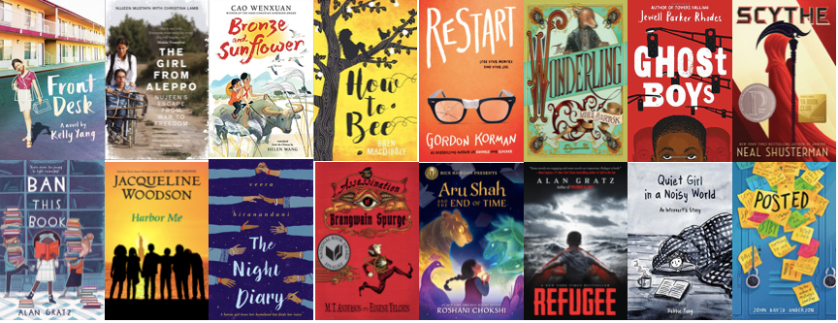
First off was selecting the books – in MS we’re literally in the middle of the reading spectrum so I could select from both the “middle” and “older” reader lists. I selected 16 of the books, leaving out a couple of picture books and trying to use books that were available on Sora so they could still be read.

Panda Knockout covers The complication in China is that not only do books have to be available with rights in China, they also have to be approved by an agency for use.  So the hurdles we climb (besides expensive platform fees and expensive digital rights that disappear after 12/24/26 months or 26 checkouts are:

  • lack of a digital version,
  • georights, or
  • publisher preferences. For example, the publisher Hachette Livre (one of the “Big Five”), don’t sell their ebooks to schools or libraries outside of the US.

Then there’s weird stuff, like “Front Desk” is available as an audiobook but not an eBook … usually it’s the other way around, books are available as an eBook but not audiobook (which kind of makes sense as there are extra costs and efforts involved recording an audiobook). I’ve reached out to Kelly Yang and she’s looking into it (love authors who are invested in helping one out!)

In the Older list we’re missing “How to Bee” and “The Assassination of Brangwain Spurge” I’ve reached out on Twitter to both sets of authors but not heard anything back yet. In the Middle list we’re covered, although it would be nice to have “Front Desk” as an eBook – there’s a hierarchy of how students like to read

  1. Not at all (lol)
  2. Physical Copy
  3. eBook
  4. Audiobook

Next step was making the knockout lists. That was a tough one. Which books to pair against each other to make it a little bit exciting – I must admit to have spent way too much time on overthinking this one.


Then I didn’t want to start the voting straight away, so for Friday (we have virtual WEIRD every Friday where I lead the Mentor discussion) I started with the motivation and getting ready bit. In order to do that I needed to set up a point system*, Libguide, Flipgrid and Microsoft Team, plus all the graphics. Needless to say that consumed all of Thursday in-between the usual Tech troubleshooting.

Moodle Message

And then it was a case of waiting with baited breath as to the response – luckily it was extremely positive – by the time I woke up at 6am European time, my “copilot” on the MSTeam had approved 83 students and by the end of the day we had 121 students and teachers signed up (over 1/3 of our student population).

IMG_6210

Yesterday I wanted to sort out the leaderboard and the scoring … that was another full day task – mainly because there is so much to set up – a current and reliable student/mentor group spreadsheet (yes, we’ve had a few poor souls who joined the school just prior to, or during the closure period), getting all the data of who had signed up to Sora – with proof, and then the most time consuming – going through the library records of each of the 16 books to award points to the consistent readers who’ve been reading the books since the start of the school year in August! A very manual procedure.

Another thing one would expect would be easy but wasn’t is extracting a list of “members” from a MS team! There’s no way to export that – so I had to copy and past from the list into excel and then sort it out and match to my master sheet.

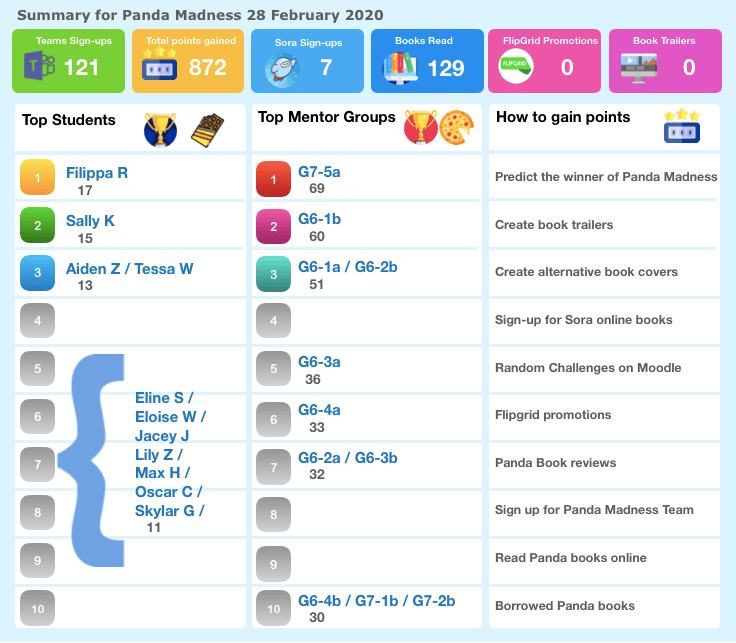
Another thing that I spent way too much time on of course was creating the graphic of the leaderboard.  I must admit to having found one I quite liked and then adapting it. On the first day students had gained 872 points and we had a history of the books being read 129 times. A lot of students / groups tied as it was the first day.

Panda Madness Leaderboard 280220

Then rubrics / criteria for the Book Trailers and alternative book covers were created. Luckily I only had to adapt these from the ISLN Readers’ Cup that I was heavily involved in during my time there, and Barb Reid kindly sent me the latest versions.

The last thing was to create a Form for students to predict the winner and to post the updated status to the Moodle announcement for Monday.

Hopefully the rest will just be maintaining the scoresheet each week and monitoring the Flipgrid; student book reviews on Oliver; and entries for the book cover competition and book trailers… The first knockout vote will be on Friday.

Let’s see how this goes and if we can achieve our aims!  Already the teams who have teachers involved (they can take part with their group) are the leading teams… says something!  Happy to share everything created with other schools affected by the closure – just flip me an email or PM on twitter with your email. Everything is on Pages and can easily be adapted / changed for different books.

==========================

*Points for now – I’ll add to this as we go on

  • 5 points for taking part
  • 5 points per Flipgrid promotion of a book (multiple promotions possible – but you must have read the book)
  • 5 points for a one paragraph review of a Panda book on Oliver
  • 2 points for every Panda book you borrowed before school closed
  • 2 points for signing into Sora (upload a screenshot to Moodle to gain the point)
  • 5 points for borrowing and reading a Panda eBook on Sora (screenshot and summary to gain the points)
  • 5 points for borrowing and listening to a Panda AudioBook on Sora (screenshot and summary to gain the points)
  • 10 points for predicting the winner
  • 5 points for predicting one of the 1/2 finalists
  • 2 points for predicting one of the 1/4 finalists
  • 1 point for predicting one of the 1/8 finalists
  • 5 points per good quality book trailer following criteria
  • 5 points per good quality alternative book cover following criteria
  • Each week new random bonus points will be awarded based on new challenges

Objects in the mirror

As we enter week 4 of online learning (and week 5 for me of the supporting and setup) a few musings on the process.

I chose today’s title because a lot of what we do is like trying to drive a car in reverse over a long distance for a long time with only a side-mirror as any view on reality. The other reason is that things are both distorted and exaggerated.

My mantra has always been that it’s not about tech, it’s about people. And that seems even truer if possible now. Students (and teachers) who were struggling in real life classrooms are struggling now. In some ways it’s just more obvious and exaggerated now. Those with a great rapport with students are re-creating that rapport albeit online. And the people who thought the usual rules and ways of doing things didn’t apply to them still think that – only it’s really messing up students ability to find what they need to do and to do it on time, so maybe, just maybe they’ll be sanctioned.

This week I wrote a blog for our parent EdTech blog forum about maintaining social relationships during online learning. What I didn’t say, because it wasn’t appropriate in that forum, was what my son said to me when I asked him what his advice would be. Besides saying he was just doing what he always did usually and that he had mates whose sleep/wake patterns were so messed up that he knew he could have contact with them no matter what the time was. He’s quite a perceptive kind of kid, and comes out with great one-liners, like this one: “the sad thing is that suddenly some kids are realising that they don’t have friends. They hang around in some amorphous group at school where they have the illusion they belong, but this just highlights they don’t have one real friend”.

It’s a time of learning so much about oneself. Like I’m usually a highly structured person with great habit-stacking and very regular when I wake up, exercise, work, read, learn Chinese, etc etc. This usually even includes holiday time when I always have great learning goals which I usually achieve (more or less, say 60-80%). But trying to be available for everyone all the time has truly messed me up big time. This weekend is the first one in five that I’m refusing to look at my emails or teams or WeChat (except for posts from friends). I’ve started refusing meetings starting at 3am-6am. And trying to force myself to bed on time (since last night). Because no proper rest means that I’ve become a bit of a brain-dead idiot myself. Even my reading has been suffering – I remarked on twitter to someone the other day that I was incapable of reading my school book club book (Down Girl) because I didn’t have the mental capacity for anything besides series of mediocre historical crime fiction and popular nonfiction (thanks Bill Bryson for “The Body” – yup that virus you predicted has come to reality, and I’m working my way to an early death right now).

So what works?

Having systems and structures and routines in place: When I originally read “When Adults Change” I thought it was a “nice idea” and something that would be “nice to have”. I’m beginning to think it really is a “need to have” at this point. Off line there is considerable room for ambiguity. Lots of opportunity to improvise and make things up on the spot or change direction 180 degrees. Online is less forgiving. Especially for people under stress. If you say that students can find their daily check-in and work for the day in place A, if it is not there about 80% of the students will assume there is no work for the day. About 10% will go hunting around using intuition and some kind of savvy and about 10% will bother to ask the teacher and/or EdTech person or their parents will do so. That means at any one time in any subject a lot of kids are missing the boat.  Having one daily entry point solves a lot of that. 

Simplifying instructions to the point of no-ambiguity: When things aren’t clear you can see on people’s faces that you need another way to explain things. That you need to rewind. That you need to do things one step at a time. Online, even in conference calls the nuances of facial and body expression are reduced to caricatures of themselves. Ideally you should only be delivering one message at a time. In clear simple language. With illustrations / marked up screenshots and screencasts. You need to say what you mean and mean what you say.

Eliminate and refine channels of communication: I tend to be quite private and don’t generally have colleagues on my personal social media, even if they’re my friends. In China WeChat has resulted in significant blurring of those personal/professional boundaries. Luckily in MS we’ve said the WeChat is not an acceptable channel for teacher/student communication. Unfortunately it is still so in HS, something I don’t support as a parent of a HS student – even if he thinks it’s ok. But I still regularly have people trying to contact me on school Tech matters on WeChat, while my order of assistance is email, teams and then finally about 4 or 5 hours later I may get to WeChat – because I still see that as my “personal space”. I’ve had to communicate that clearly to people at the risk of them feeling it’s unkind of me.

For students I’ve recommended that teachers eliminate one-on-one communication by email as much as possible for “communal” issues. If students post a problem in a communal forum, the chances are (a) more students have that issue / misunderstanding (b) some student has already resolved the issue and can help the others (c) everyone sees the issue and the solution. So anything from two to 60 one-on-one emails are eliminated. On the other hand it’s good to have one-on-one (with another adult in the room) mentoring sessions to make sure that students are no isolated and are feeling supported.

Knowledge management – Curate and publish FAQs & Issues: Thank heavens for Libguides * at this stage of the game. I’ve always been a fan, but now I can not only “can” responses but also point people to a central place where they can (hopefully); help themselves. I have a central one that points teachers, parents and students into more detailed pages. A couple of things I see happening are well documented in EdTech lore – the “waves” of adoption and understanding. We have the early adopters (along with the EdTech team) who already were tech savvy and quickly work out the tools and issues. So their questions become valuable in setting up the FAQs about your basic LMS, they then move onto experimenting with other tools, and gaining and sharing expertise and issues in these (like Teams). Besides this there are some amazing groups on WeChat China Tech who’ve been experimenting and documenting and helping each other (Thanks James Rong – the Teams Guru) Then the bulk of teachers start having the same experiences, and if you’ve had time to document things you can point them to this.

Then you have the very long tail of people who have not been keeping up with developments and out of the blue want to use tools that are either obscure or have already been tested and failed.  That’s what we are experiencing right now.

Keep things minimal and simple: managing EdTech has always been a balance of having a few “old” tried and tested tools and giving teachers and the Tech team the freedom to experiment and try things out with the hope that something amazing is around that corner that will be a game changer. Very few new tools are truly game-changing. Even Microsoft Teams for Education, which is pretty good but still has a LOT of work to do before it’s ready to take over the learning space (I’ll write more on that some other time).

Now is NOT the time to throw new tools and edtech at teachers and students/families. See my point above about one daily entry point. It’s also not the time to expect students to use seven different tech tools to complete one piece of work, with the risk of failure to connect at each point. It’s also not realistic to expect your IT support staff to have to up-skill to be able to support all the many and various issues that may arise. That’s why it’s important to be able to either say “no” or “only if it’s proven to work in China and you’re on your own if things go wrong”.

Don’t create busy-work – remember your educational goals. This is really important. In the first week of closure I noticed at home with my own son (first year IB), the difference between the teachers who were in tune with the idea of online learning as an asynchronous experience that would be used to continue teaching and learning and those who saw it as a delivery mechanism for work-sheets and busy-work. Online learning is hard – particularly if no-one (teachers or students) signed up for it in the first place. It requires extraordinary levels of self-motivation. It’s far more “active” and “harder work” in the sense that generally in a normal school situation students can gain a lot of their education by passively going to classes and absorbing what’s going on.

Some of our students are discovering previously un-tapped resources of self-discipline and self-motivation. Many of our teachers are being amazingly innovative. A lot of very positive things are coming out of this experience. Both the positive and negative are just very magnified right now.

======================

* As regular readers of this blog know, I’m a huge fan of Libguides during this period they’ve become even more valuable than every before in information and knowledge curation. For their quite modest price they definitely punch above their weight in reliability and accessibility. And they’re not hard to learn – some of our teachers have jumped right on board and with a bit of training and help have created amazing guides – see this one for our G5 PYPx on Sustainable Development Goals made by @MrsBidder

Photo by Elly Filho on Unsplash

Preparing for closure – don’t make it about Tech

By now the nCOV potential pandemic is world news and international schools over China are in (full) preparation mode on how to continue teaching and learning via online modalities. As part of my preparation, I’m planning to blog daily. Because it’s not about the tech. It’s about mental and psychological preparation to sit this out, continue to learn and teach (what I put up for our community).

If I were to gift every student, teacher, administrator and parent one thing, it would be a copy of Anne Frank’s diary. The new graphic novel version is particularly good. And a blank lined notebook and a pen.

Funnily enough, it struck me that if it weren’t for my librarian/tech integration hybrid role, I wouldn’t even be involved in these discussions. I’m always astounded how far down the list of people thought about, librarians lie, and education twitter folk must be tired of me answering every question on collaboration and curation and resourcing with “have you asked your teacher librarian”.

Whatever. I’ll write this from the point of view of a librarian who happens to be techie and cynical about tech, but passionate about learning and maintaining learning.

What have we put in place so far for school closure

In the days before the spring break, we created a “closure” tab in our Moodle Learning Management system in middle and high school. [We’ve been looking for an alternative for years now, but between our innovations in student learning and agency and the “China” factor, haven’t managed to move forward in that.] Within the tab we have a learning forum where students and teachers can interact asynchronously with each other. The expectation is that teachers will post a lesson each day that a lesson would have taken place (i.e. 5 times per 9 day cycle) and students check in and respond and do the assigned work. Elementary school will continue to use blogs.

What else do we have?

Regulars to this blog will know I’m a huge libguide fan and I have an extensively curated set of resources for our middle school (students, teachers and parents) that can be accessed through our main library page.  Unfortunately our 16,000 book collection is inaccessible, however we do have Overdrive/Sora, and a range of Kindle/audible books for students who borrowed the devices before the break. There are also extensive collections of books on Epic, (available during school hours) so I’ll spend a little time curating some suitable titles for each grade level to share out to students and parents.

We recently purchased a (very expensive) subscription to Newsela, that should prove a boon to students wanting to improve their nonfiction text comprehension / vocabulary and general / specific content knowledge.

Our language department has been using Education Perfect for a while now with considerable success, and we recently started a trial with their Science modules.

For our budding writers, it would be a great opportunity for them to try out things like Wattpad and other interactive writing tools.

We’ve also been experimenting with Microsoft Teams for Education, and while it’s a very promising tool, it’s a business tool that’s being adapted for Education, and there are some substantial things that don’t (yet) make it suitable to take over as an LMS. It’s moving pretty rapidly and has some really nifty bits, and if they listen carefully to their educational users it has potential to wipe a lot of things out in its wake. James Rong from Guangzhou International School is the China expert on that and worth following. Here’s his guide to setting up Teams for learning. 

Personal

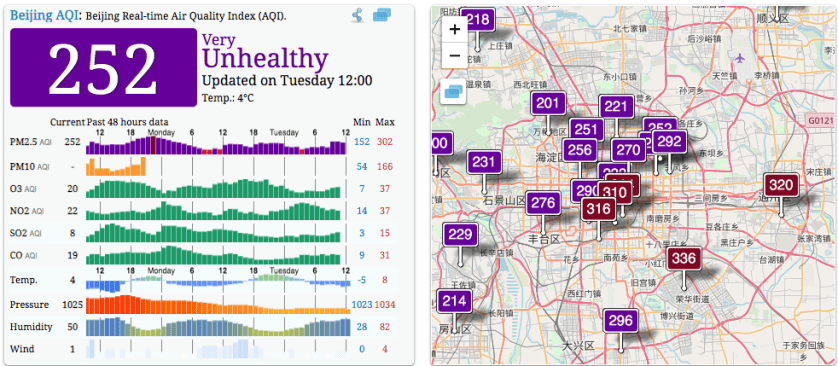
The first thing I had to do was tell myself that vacation or no vacation I have to start getting a rhythm going and some good habits. During term time I’m good at habit stacking, up at 5am, gym clothes ready to put on, work clothes & breakfast/lunch packed to go, 5.30 taxi – doing my Chinese Memrise flashcards on the way to work; 6-6.50 gym; at my desk by 7.15am. Now I have the issue that my husband is at work in Nanjing, my son is with his girlfriend. There’s nothing stopping me from doing nothing but watch Netflix or twitter/FB updates. The pollution outside is diabolical (unusually bad for a period when all the factories are closed) – so while I’d usually be up and going for a walk/run along the river, that’s not really an option.

Screen Shot 2020-01-28 at 12.37.26

Once my online meeting is done I’ll set myself some personal goals as well.

So status update:

Currently: D5/10 of the Chinese New Year vacation
Schools closed until: 17 February 2020

Overview of government site

Beijing status 1 pm.

Screen Shot 2020-01-28 at 13.01.18