Last night I saw a flurry of posts on one of my Facebook groups – the one with teachers who are students, often back to school after a gap of years or even decades. That was me 30 months ago. Yes I had spent two years studying Chinese at HKU more recently, but that was a more hands / ears / body on task physical exercise than the more recent CSU experience of first doing my MIS and now my M Ed (KNDI). I promised if I had time after my assignment for today, I’d post a little about how I manage using a combination of paper, coloured pens and Evernote to keep on top of my reading and modules. I’ve written briefly about using tools to organise one’s studying, an article in Incite which unfortunately wasted too much space on a picture of me in lieu of what I wanted, which was screen shots of how to do stuff. At some point I’d like to do some screen casting of how this all works in reality, but since I’m moving house next week, I just don’t have the time to edit it down to something quick and slick and presentable!
Here is a step by step account of what I do (CSU resources, plus Evernote Premium (paid) plus Zotero (free) plus Word for Mac 2011 and a desire to print as little as possible):
1. Open a new notebook in Evernote for my new course
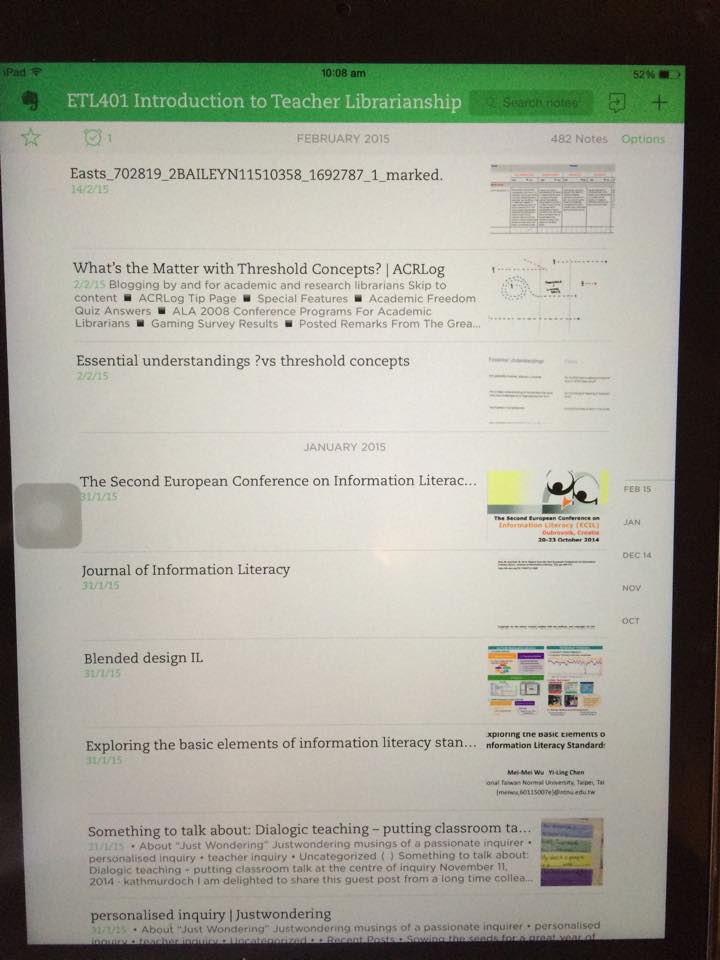
As you can see here my whole life is on Evernote – personal, professional and learning, each have their own notebook. You can also group notebooks together (I’ve put all my CSU courses into the CSU group, although I keep my most current course floating as it’s then easier – less clicks) to add to the notebook. Because Evernote is so wonderfully searchable, there is no need to file by module or topic, you can just tag notes if you want, or not.
2. Go into the modules and download the Subject Overview and individual Modules
I then go into Interact (2) and download the subject overview and individual modules and save as PDF files. I also print these, single sided and file them. This is the only printing I do during the course. It was not always so, but I couldn’t stand the waste of paper and needed a more efficient way!

I put all the module pdf’s onto my desktop and then drag them into my Evernote Notebook. I also have the Evernote app on my iPad, and I make sure that at the end of each day I synchronise between my laptop and my iPad so that they’re both current. Because I have Evernote premium I can read all my notes OFFLINE – very important to me, as I don’t have 3/4G on my iPad, only Wifi, and I don’t always have Wifi in the places I’m snatching moments of study!
3. Find the Schedule and put the dates into your physical / virtual calendar with reminders!
4. Start populating Evernote with everything you need to read
I usually take a moment when I’m tired and want to feel productive but I just don’t have the energy to do hard thinking or reading or writing work. I open the modules and start clicking on every link.

Then I do the following:
Journal Articles
Go to Primo, find the article, save / download as a PDF (I just tag it and dump it on my desktop).

At the same time find the “cite / export citation” button and save the citation in the format you need for your citation tool (I use Zotero, so it is a RIS file.


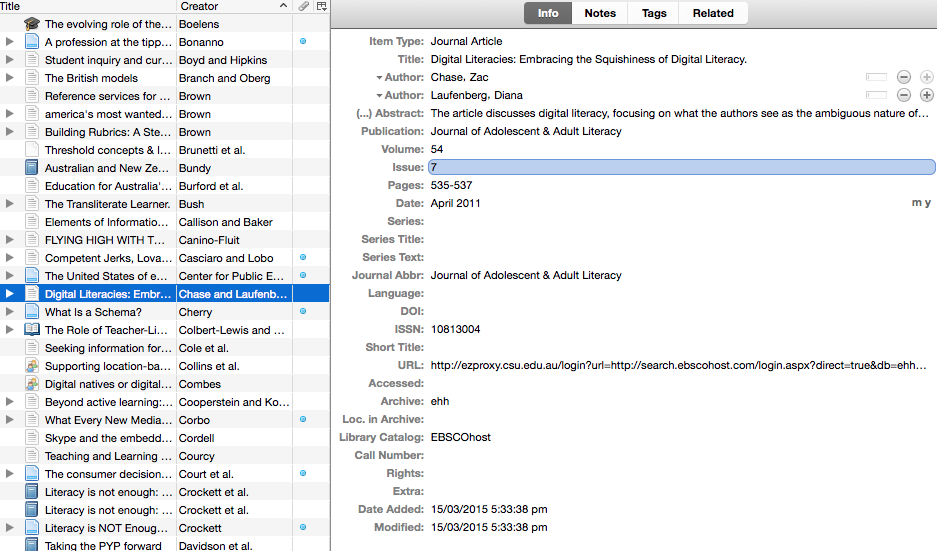
In Zotero I open a new collection

And then I import the
“RIS” file into Zotero, (just need to click on it, with Zotero open on the correct collection) making sure all the files are completed correctly.

Websites
For websites, I use the Evernote Addon, so I just need to click on it, and I can save the article / site onto Evernote into whatever notebook I choose:

I
In order to save the citation, I right-click in order to activate the Zotero addon, which will save the URL and any correctly coded information (usually this is not much, only URL and title – so you need to manually put in the author, date, website name, etc. to ensure a co rrect citation)
I repeat this process for eBooks (“print” the relevant chapter to PDF, put the ISBN into the Zotero wizard), and other material. You can save the links to YouTube and Vimeo videos, I’ve not bothered to put them in Evernote – I try to watch them on my laptop – if anyone has a good solution for that besides downloading and taking up a lot of memory to watch offline …
I then have a desktop littered with lots and lots of pdf files, and I then just drag and drop the lot into the correct notebook.
5. Sync Evernote on iPad to Laptop
Because I’m working and a mother and taxi-driver, I spend quite a bit of “lost” time waiting for kids at sports or picking them up etc. Often I then don’t have access to wifi. I’ve paid for the premium version of Evernote for this reason. In any event, with or without wifi, my way of studying is then as follows (obviously this is personal).

I will add another few things about Evernote. It is very collaborative. So you can share notebooks with fellow Evernote users. If you get yourselves organised you can share who collates the information for which module and set up a group. Or ask a fellow student who has done the course already … but please consider academic honesty, plagiarism, digital citizenship and all that when you do these things.
6. Start reading and reflecting
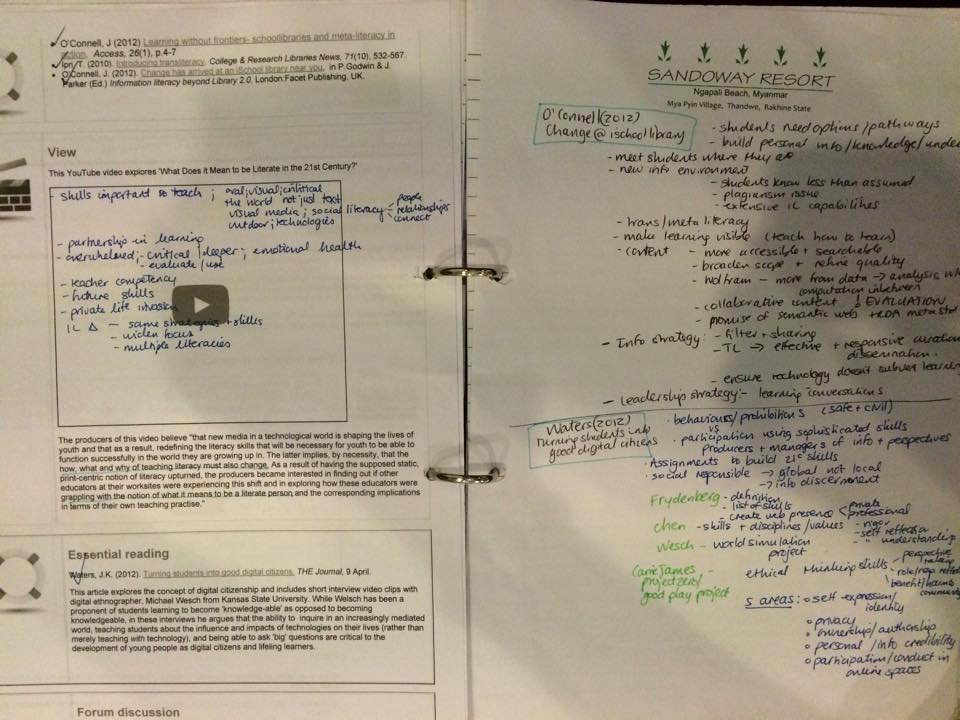
I take the next chunk of work I need to do and put the printed out modules in front of me. As I read the module, I tick the paragraphs. When I get to a reading, I will then open the reading in Evernote ( the search function is amazing) and start reading. As I read, I take notes on the blank left hand side of the module so it is opposite to where it is referred to in the module. I’ve made a personal convention for my note-taking. I do it in blue or black and put references to people and other readings in green and important items that I’ll want to refer to later in my assignments or blog posts or think more about in red. This is what it looks like (If I’ve printed the modules double sided, I put my notes on other paper as close to the module where it is referred to as possible). I don’t skim much to be honest, but some articles / book chapters etc. merit more note taking than others. Some are just a repetition and some are gold mines.
7. Writing an assignment
When it gets to writing an assignment I just glance through my modules and find the relevant sections / key words. I then glance at my notes and focus on the purple / green bits. I look for more articles in Primo by referring to the authors who have written on the subject and are frequently mentioned. I also “file” those articles into Evernote and the citations into Zotero as I collect them.
When I’m writing, I try to plan out what I want to say, and then I will try and find research to back it up. Because Evernote is so searchable, I can search on key phrases or words or combinations of words and get a listing of all the articles they appear in. I can then quickly scan these and see if they are worth citing.
Since Zotero has a word add on, I just have to Click on “insert citation” and it jumps into Zotero

I can then choose the author / article title and decide whether it is a direct quotation (add the page or paragraph number) and how I’m going to cite (author, date); author (date); author …. (date) etc.

When I’m finished I just say “insert bibliography”
and it completes the entire bibliography in APA style, alphabetical order etc.
If I’m editing and I delete a citation / paragraph, I just have to update it, and it’s all correct again.
NOTE:
This is just one way of getting organised. There are many ways and many tools, you need to experiment and find your own way as to what is comfortable for you. For example, one lecturer suggested we just print the first page (with the abstract) of each article and make a summary on that page. If anyone has further tips and tricks, please add comments to this. I’d also like to learn of other ways to make things easier.
 Informative Flights - Musings of a Teacher Librarian