If we build it will they come?

In my past “homeless” week I’ve had opportunity to offer PD to my fellow librarians & library staff and to some teachers, and also to go into classrooms for a longer period of time and help with research, and I’ve had time to find, curate and put resources onto our libguides, and I’m hot-desking in the coordinator’s office. Its’ been a very informative time.

What I’ve learnt:

  • Never make assumptions about a basic level of digital literacy – just because you’re comfortable with screenshots, copying and pasting, using short-cuts etc. your audience may not be. Often they only know the very specific applications and programs (and operating systems) that they need for their specific tasks in their job.  You need to be very explicit and slow in explaining things.
  • Many many students do not know the difference between being in a browser window and typing in a URL (even a shortened one) and typing in a search term in a search box since the two have become ubiquitous to them – and Chrome as a Google product has played into that by allowing you to access either a search or an address from either. That’s something I never paused to think about, as a computer child of the 80’s they were very distinct things. This is philosophically interesting and I wonder if it impacts on understanding the nature of search and query?  I see a considerable amount of blurring generally – and if one thinks of aspects of information literacy in terms of threshold concepts I’m wondering if all these developments, while apparently making things easier are actually making them more difficult?

My biggest learning is that I have a poor understanding of how, where, why and when students and teachers access information. I’ve gone for a (at least) three times redundancy concept in providing access to anything –

  • in the OLP (Online Learning Platfrom – both on the homeroom page AND on the library page)
  • on the front page of our OPAC
  • on our Library Guides

In initial library lessons we’ve also had students (and teachers and parents – in our library bytes sessions) bookmark the 3 primary sites – the catalog, the library guides and then library OLP page. But the issues with information seem to be more deep-seated than that. I suspect that there is still confusion about not even knowing why you’d want to access anything – a kind of informational existential issue.

I’m guessing about 10-15% of the students in a class are making full use of the resources we’re providing.  Our school is probably not unique in this. I hear the same lament everywhere.  There is the saying of “meet your customer where they are” (not where you want them to be) and I think we neither really always know where they are – or we suspect they’re just on google, nor are we able to meet them there. AND OUR VENDORS ARE NOT HELPING US!  Let’s take our OPAC / Catalog as an example. Follett has finally woken up to the fact that google, and not our catalog or databases is the first place students look, so they’ve come up with a very nifty chrome extension that allows you to plug in your catalog (and webpath express) as the first search result – like below

screen-shot-2016-12-10-at-10-42-09-am

But, it only works with iOS on desktops / laptops. And we’re an iPad school (not an android / chromebook school). So it doesn’t work on iPads. So far so useless actually.

Oh, but there is a Destiny Discover App for iPads… except all it does is try to update every time you access it, and it gets to 31% and then crashes. And you can only set age / Lexile / grade level limiters to books, not databases or online resources, so it’s even more overwhelming than good ole google.

So at our last inter-campus librarian meeting we decided to try and encourage entry and access to our paid resources by making them options on our UOI guide resources page – so we’ve semi-standardised our boxes to have Books (with a link to the catalog via Librarythingsforlibraries book display widget), Videos (since Youtube is the 2nd only to google as the “go to” place for student research) and Resources (including Britannica, Brainpop, Epic Books and other curated links).

screen-shot-2016-12-10-at-10-51-56-am

The thought is, that they then don’t have to leave the page in order to go to a resource, they just click on the picture, and get to say Britannica, and once they’re there, the threshold is lower to then search for something from within there … we’ll see what the reality is.  I’ve also explicitly told them this in their last research lesson. Now to follow up and see if the usage stats change.

So what now? 

I think I need to move to a simpler and more intuitive layout – Following Katie Day’s layout for her research guide, perhaps making it student question related?
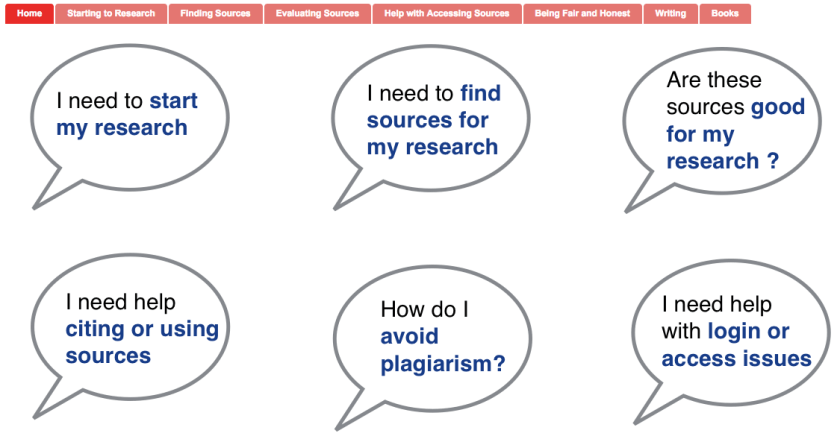
screen-shot-2016-12-10-at-11-08-41-am

At a whole different level is the services and guides that happen at Scotch College ….

screen-shot-2016-12-10-at-11-15-54-am

I think I need to sit down with teachers and students and really understand how they use information, how they look for it and where they expect to find it. Customer journey maps – something that I was thinking of as an alternative study avenue before I looked at our Blokes with Books club as my case study. Has anyone looked into that in the library context? I know people have looked at social media in library, but this is different – the physical and digital paths our patrons use to get information (or get frustrated by us). Any pointers?


Are we there yet? No … and this is why – an appeal to database owners and academic libraries

I’m about to write another assignment.  This must be about my 40th serious assignment of over 1,500 words requiring academic research, looking for good peer-reviewed studies, reading through 1,000’s of pages to try and distill exactly what is being said, whether it is of relevance (directly or tangentially), and once I’m finished that to pause and think and think and think and try to come up with some new insights, some different ways of applying the theory, some critiques that go beyond the obvious.

As I’ve written before, (unfair advantage, / how I used to write) the true work isn’t in the procuring of the articles, it’s in discerning their relevance, it’s in rejection rather than reading.

So why am I, Anno Domino / Common Era  2015 STILL spending so much time on the library database doing silly work. Honestly, those who lead academic libraries and who run academic databases please tell me why this isn’t easier, faster, more streamlined?  Is it me? Am I doing something fundamentally wrong?

Yes I know how far we’ve come and how much easier this is than 10-15-20 years ago. Yes I also studied in the days of micro-fiche where you didn’t even bother finding articles because it just went into the box of “too hard”.  But we do have the tools now and we have progressed further so there should be no excuse as to why the “stupid” work is taking up so much of my time.

Right now I’m looking for good literature on “Classroom Libraries” as opposed to “libraries” in the use of space and resources.  I put in a federated search. At the same time, I search Google Scholar.  I open tabs of dozens of potential articles, reject many, decide to proceed with some.

As you all know by now I’m a huge fan of Evernote.  I put my entire life, but particularly my academic life into Evernote.  And as I stuff it full of articles, I also at the same time put the citations straight into Zotero, (my citation manager of choice – yes I know there are other new ones like RefMe that everyone is raving about, but Zotero has served me well and they’re very responsive to comments and suggestions).  But WHY oh WHY is it still such a pain to get an article in a PDF format, a citation into a RIS format and both tucked up securely into the bedding of choice?

Time for some pictures … follow the captions for what I’m trying to say

Screen Shot 2015-09-20 at 11.46.32 am
Primo Search – CSU Libraries

Let the GAMES BEGIN!


Screen Shot 2015-09-20 at 11.20.22 am
Google Scholar (with the addition of the CSU library link)

Google Scholar (with the addition of the CSU library link) makes things much easier – I confess I’d rather click on a dubious link than the library link because it will take me straight to the article / pdf. It does make citation a bit more of a pain without the citation tools, but at least I can accept or discard it more quickly. On the other hand – there are way too few limiters for Google Scholar … as a distance learner, I don’t usually want books that I cannot access or where no eBook is available


Screen Shot 2015-09-20 at 11.20.34 amThe open tabs in my browser once I get searching for articles … and that’s on a slow day

Screen Shot 2015-09-20 at 11.21.21 am

delivery.ris? out? blah blah, how about downloading me some meaningful names?

Screen Shot 2015-09-20 at 11.19.52 am
When I click on an article, if I’m lucky I get something nice and neat and tidy like this

But it’s only after a year or so of using databases that I built up experience in knowing which would get me the article most efficiently and with the least number of clicks and doubts

Screen Shot 2015-09-20 at 11.20.03 am
If I’m not so lucky I get this –

Did you see all those tabs open on my browser – I don’t even have any idea what on earth is article was, so I just stab for my favourite database and hope for the best. If it goes wrong and I need to do an advanced search … expletive time

 Screen Shot 2015-09-20 at 11.20.52 am

So I ask you nicely for the pdf. But then it just opens in a new browser window and I STILL have to click “print” and then “print to pdf” and then if I’m lucky it will retain the title or author as file name, and if not it will be “out/pdf” or “23489038” or “gobblydy gook got you there” or even worse “something.html”.

Screen Shot 2015-09-20 at 11.22.07 am

The extra steps in getting a pdf onto your desktop and then into Evernote, don’t press “SAVE” because then you get an HTML file which is pretty useless!

Screen Shot 2015-09-20 at 11.20.59 am

Such a short life, so many choices. And so many of them don’t actually provide what you think’s on offer. Cite? Sounds good – no that just means you copy and paste the citation into your document. Which makes it “dumb” data – You actually need “export” and then you need to click through a couple of times until you get the RIS file in your downloads

Screen Shot 2015-09-20 at 11.21.08 am

Riddle me, Riddle me Rhy,
which of these options should I try?

Screen Shot 2015-09-20 at 11.21.36 am

Zotero – Yes I do want to import, otherwise I wouldn’t have clicked on the RIS file in the first place – why make a one click step into a 2 click process. (But don’t fret too much you’re not the worst of the redundant click club)

Files waiting for transfer

Phew … A subselection of files, tabbed and colour-coded waiting to be put into the correct notebook in Evernote.

Screen Shot 2015-09-20 at 12.28.01 pm Just drag and drop and then the real work starts – roughly an hour or so for 10-15 articles and their citations … if you don’t get sidetracked by writing a blog post on the whole process!

NOW … If I ran the circus …

Let’s be completely impractical and totally utopian. See the top photo in the top left column?  I’d add two buttons to each entry:

* One click *.pdf download (with tagging allowed)
* One click *.ris download

because you see, as long as I can get the article, I don’t give a &*^*&^ (insert expletive of choice) which database it comes from. Just give the me the pdf.  With a sensible name like the title. And believe me, I don’t have the time or patiences or hard-drive to keep articles that are of no use for me, so I read the abstract and  delete.

Another circus I’d like to run – those learning modules.  I’ve been around the block a bit, and I’ve seen inside libraries.  A certain academic library that shall not be named in a town that shall not be named has a whole department dedicated to copying articles for coursework for their students who then get a bundle. Hard copies. Trees dying.

At CSU we judiciously just add links to the articles in primo, which the student then has to click on and go through the whole rigamarole highlighted above. Oh for heaven sake, just stop the pretence and put the articles into subject reserve in pdf form.  Who are we kidding that this is meaningful work or adding to knowledge? And then the links that don’t work, and instead of everyone going off and sleuthing how to find the article and thereby actually learning something, there is just a host of complaints on the boards that the article isn’t there.  Finding coursework articles that have been pre-selected by a lecturer does not a good student make. And we’re foolish to pretend it is so.  The success is in the seeking out of related material from other fields and dimensions that may not be thought of, in finding links and relationships, and then seeking those articles and selection and casting aside and applying that to the task at hand or real life that is the mark of the better student.

So now I’ll get back to the boring work.  And just as an aside mention – the databases that do it half ok?  ScienceDirect I always like – clean and easy and good with recommendations on related articles.  Proquest isn’t bad, and I like their little sidebar extras like seeing how many articles in which years / decades so you can see the rise and fall of fads.  EBSCO and JSTOR you’re ugly and clunky and too-many clicky and I avoid you as much as possible.

And here’s an open invitation – if all this is my own  stupid fault because I have nary a clue what I’m doing, please comment and tell me so and let all of us know a better way.