
In my past “homeless” week I’ve had opportunity to offer PD to my fellow librarians & library staff and to some teachers, and also to go into classrooms for a longer period of time and help with research, and I’ve had time to find, curate and put resources onto our libguides, and I’m hot-desking in the coordinator’s office. Its’ been a very informative time.
What I’ve learnt:
- Never make assumptions about a basic level of digital literacy – just because you’re comfortable with screenshots, copying and pasting, using short-cuts etc. your audience may not be. Often they only know the very specific applications and programs (and operating systems) that they need for their specific tasks in their job. You need to be very explicit and slow in explaining things.
- Many many students do not know the difference between being in a browser window and typing in a URL (even a shortened one) and typing in a search term in a search box since the two have become ubiquitous to them – and Chrome as a Google product has played into that by allowing you to access either a search or an address from either. That’s something I never paused to think about, as a computer child of the 80’s they were very distinct things. This is philosophically interesting and I wonder if it impacts on understanding the nature of search and query? I see a considerable amount of blurring generally – and if one thinks of aspects of information literacy in terms of threshold concepts I’m wondering if all these developments, while apparently making things easier are actually making them more difficult?
My biggest learning is that I have a poor understanding of how, where, why and when students and teachers access information. I’ve gone for a (at least) three times redundancy concept in providing access to anything –


- in the OLP (Online Learning Platfrom – both on the homeroom page AND on the library page)
- on the front page of our OPAC
- on our Library Guides
In initial library lessons we’ve also had students (and teachers and parents – in our library bytes sessions) bookmark the 3 primary sites – the catalog, the library guides and then library OLP page. But the issues with information seem to be more deep-seated than that. I suspect that there is still confusion about not even knowing why you’d want to access anything – a kind of informational existential issue.
I’m guessing about 10-15% of the students in a class are making full use of the resources we’re providing. Our school is probably not unique in this. I hear the same lament everywhere. There is the saying of “meet your customer where they are” (not where you want them to be) and I think we neither really always know where they are – or we suspect they’re just on google, nor are we able to meet them there. AND OUR VENDORS ARE NOT HELPING US! Let’s take our OPAC / Catalog as an example. Follett has finally woken up to the fact that google, and not our catalog or databases is the first place students look, so they’ve come up with a very nifty chrome extension that allows you to plug in your catalog (and webpath express) as the first search result – like below

But, it only works with iOS on desktops / laptops. And we’re an iPad school (not an android / chromebook school). So it doesn’t work on iPads. So far so useless actually.
Oh, but there is a Destiny Discover App for iPads… except all it does is try to update every time you access it, and it gets to 31% and then crashes. And you can only set age / Lexile / grade level limiters to books, not databases or online resources, so it’s even more overwhelming than good ole google.
So at our last inter-campus librarian meeting we decided to try and encourage entry and access to our paid resources by making them options on our UOI guide resources page – so we’ve semi-standardised our boxes to have Books (with a link to the catalog via Librarythingsforlibraries book display widget), Videos (since Youtube is the 2nd only to google as the “go to” place for student research) and Resources (including Britannica, Brainpop, Epic Books and other curated links).

The thought is, that they then don’t have to leave the page in order to go to a resource, they just click on the picture, and get to say Britannica, and once they’re there, the threshold is lower to then search for something from within there … we’ll see what the reality is. I’ve also explicitly told them this in their last research lesson. Now to follow up and see if the usage stats change.
So what now?
I think I need to move to a simpler and more intuitive layout – Following Katie Day’s layout for her research guide, perhaps making it student question related?
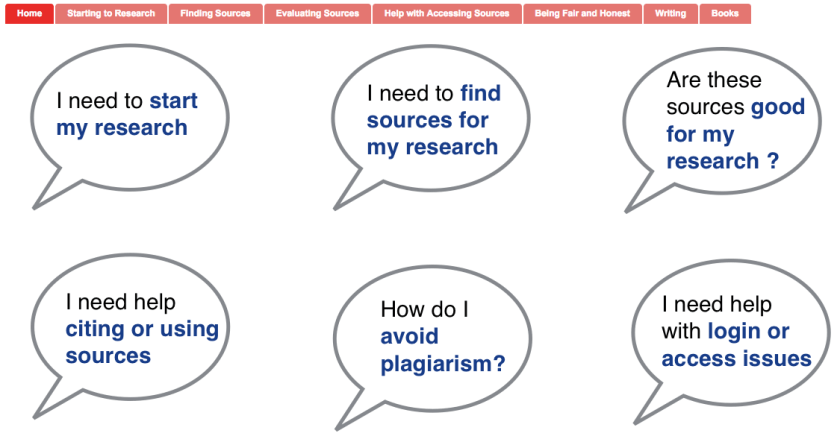
At a whole different level is the services and guides that happen at Scotch College ….

I think I need to sit down with teachers and students and really understand how they use information, how they look for it and where they expect to find it. Customer journey maps – something that I was thinking of as an alternative study avenue before I looked at our Blokes with Books club as my case study. Has anyone looked into that in the library context? I know people have looked at social media in library, but this is different – the physical and digital paths our patrons use to get information (or get frustrated by us). Any pointers?

 Informative Flights - Musings of a Teacher Librarian